I am not a fan of gotos, all programs in general need to run through to the end without jumping back on themselves. the reason for this is that the T3 controller buffers the output state till the last line of the program and as the code exits it will write the state of the outputs to the actual hardware. A program that never exits is not going to function well if at all.
So here’s the way I would suggest and its very simple thanks to the built in timing functions:
First fill in the name of the input, output and create a few variables to hold the valve timers. Set up the units of these timers as time. Create the PID controller as shown at Tab4.
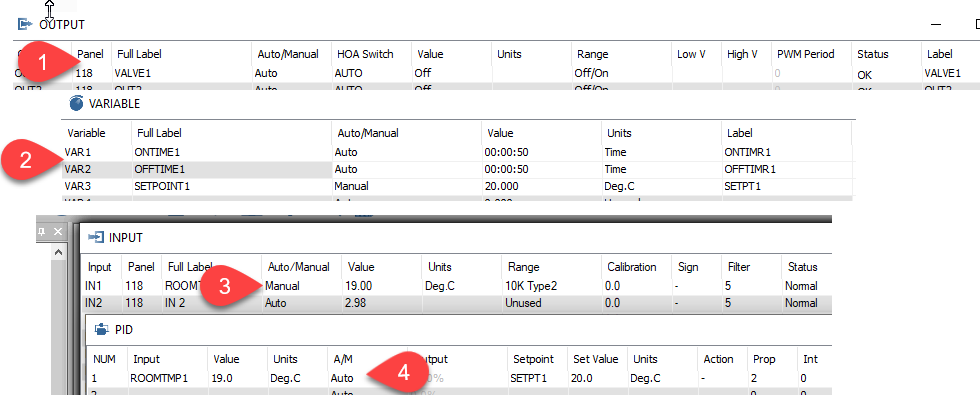
And now the program, its quite short because the built in commands take care of the low level details.
10 ONTIMR1 = PID1
20 OFFTIMR1 = 00:01:40 - ONTIMR1
30 IF TIME-OFF ( VALVE1 ) > OFFTIMR1 THEN START VALVE1
40 IF TIME-ON ( VALVE1 ) > ONTIMR1 THEN STOP VALVE1
I checked the operation of the program by switching the PID to manual mode near tab4. Type in a number for the value from 0 to 100 percent and watch the results as VAR1 goes from 0:0:0 to 0:1:40 while VAR2 does the opposite. When you’re done testing be sure to flip the PID controller back to auto.