Priority array is one of my least favorite topics, in my opinion the controller should control its own outputs. Commands from external masters can be taken into account by having them write to variables that are used by the local controller logic. This way you know exactly where to look when debugging programs.
That said, here is how we handle priority array in the T3 cointroller environment:
And here is my take on what may be going on:
Priority 9–16 is failing
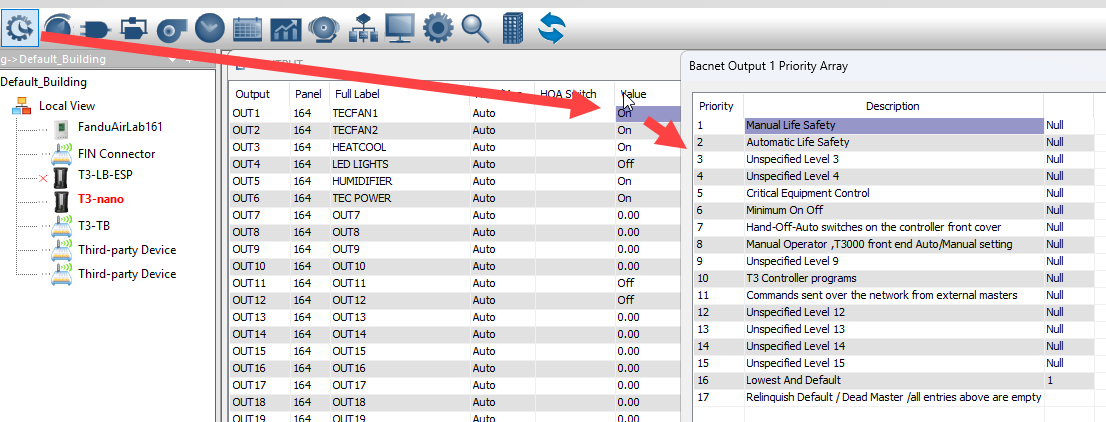
Even with the latest firmware, the hierarchy remains strict. The reason Niagara writes are “failing” at those lower priorities is that something with a lower number is already in the array:
- Priority 7: Physical Hand-Off-Auto (HOA) switches on the controller.
- Priority 8: Manual overrides from the T3000 software.
- Priority 10: The internal T3-BB BASIC program.
If you write from Niagara at Priority 11–16, it is automatically overridden by the local program at Priority 10. It works at Priority 2 because that is a high-level override that beats the internal logic.
How to troubleshoot in T3000
Since you are on the latest version, you can verify this from the T3000 front end:
- Open the T3000 UI.
- Right-click on the value of the output in question.
- The Priority Array will pop up, showing him exactly which slot is active. If he sees an entry at Level 10, he knows his internal program is the one blocking Niagara.
Final Tip
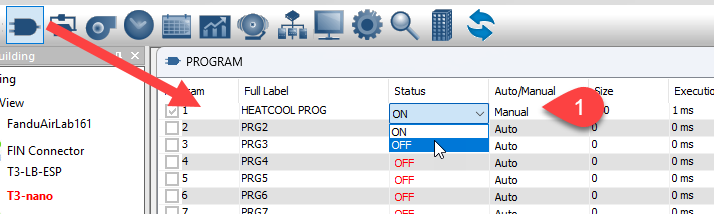
To give Niagara control at its default level (usually 11 or 16), you can turn off the local program temporarily to clear the higher-priority slots. Set the Status to manual then toggle the program off.