Hi,
I am testing the T3-BB on a site with Niagara N4. Few things I noticed
Niagara when writing to AO/DO point, it cant write to Priority 9-16, program works fine on Priority 2.
The T3-BB often gives failed points and loose communication, I have changed the APDU setting to 5000ms and lets see it it helps. APDU setting in the T3-BB is at 60000ms. The error I was getting is “Transaction:timeout: invoke ID 74” and it connected over BACnet/IP.
I have the MSTP connected to field device (boilers) and it wasnt showing up (often wouldnt see it in T3000 or Niagara) but I manually added them. Now I cant scan the bacnet points of the devices.
I do what the software as well as the T3-BB updated last week.
Just got the below from Application Directory for your review.
Mechanical_PH is T3-BB connected with IP to Tridium.
WARNING [14:58:30 10-Feb-26 EST][bacnet.point] TransactionException writing point value for analogOutput:18:Present Value:-1:REAL in BacnetDevice {Mechanical_PH}: Transaction:timeout: invoke ID 73
Transaction:timeout: invoke ID 73
at com.tridium.bacnet.stack.transport.ConfirmedRequestPdu.waitForConfirmation(ConfirmedRequestPdu.java:502)
at com.tridium.bacnet.stack.transport.BBacnetTransportLayer.sendConfirmedRequest(BBacnetTransportLayer.java:451)
at com.tridium.bacnet.stack.transport.BBacnetTransportLayer.sendConfirmedRequestSimple(BBacnetTransportLayer.java:339)
at com.tridium.bacnet.stack.client.BBacnetClientLayer.writeProperty(BBacnetClientLayer.java:1180)
at javax.baja.bacnet.point.PointCmd.run(PointCmd.java:177)
at javax.baja.util.Worker.process(Worker.java:168)
at javax.baja.util.Worker$Processor.run(Worker.java:141)
at java.lang.Thread.run(Thread.java:748)
SEVERE [14:58:42 10-Feb-26 EST][bacnet.transport] Transaction Timed out! invokeId 74
SEVERE [14:58:42 10-Feb-26 EST][bacnet.transport] Transaction Timed out! invokeId 75
INFO [14:58:42 10-Feb-26 EST][bacnet.client] TransactionException pinging BacnetDevice {Mechanical_PH}: Transaction:timeout: invoke ID 74
INFO [14:58:42 10-Feb-26 EST][bacnet.client] TransactionException in poll() for BacnetDevice {Mechanical_PH}:pl=5099 PollList [Mechanical_PH device:6300 6301:10.10.70.150:47808] 46a4d2da {357} PD [0] 1 PLE
SEVERE [14:58:42 10-Feb-26 EST][bacnet.transport] Transaction Timed out! invokeId 76
INFO [14:58:42 10-Feb-26 EST][bacnet.client] TransactionException in poll() for BacnetDevice {Mechanical_PH}:pl=5099 PollList [Mechanical_PH device:6300 6301:10.10.70.150:47808] 46a4d2da {357} PD [0] 1 PLE
INFO [15:03:24 10-Feb-26 EST][sys] Saving station…
INFO [15:03:25 10-Feb-26 EST][sys] Saved C:\ProgramData\Niagara4.10\vykon\stations\HighLight_Condo\config.bog (672ms)
INFO [15:23:42 10-Feb-26 EST][fox] Opened: ec54b8f962e42953bda61427e3d326561a49b24c59fa31366e ← f3d6a82b2cdaac7036a88b1ccbffc3eb81aa8736f946e44526 :: Workbench @ TECH-SERVER
INFO [15:36:47 10-Feb-26 EST][alarm.database] Created
INFO [15:37:37 10-Feb-26 EST][bacnet.client] BACnet Error downloading T3-BB [device:6300]:
Failed write for device:6300_numberOfApduRetries[-1]:Property:Unknown Property
WARNING [15:37:38 10-Feb-26 EST][bacnet.client] Cannot write property numberOfAPDURetries: bacnet:BacnetUnsigned in T3-BB [device:6300]:Object:Unknown Object
INFO [15:51:52 10-Feb-26 EST][bacnet.transport] Reconfiguring Transport layer lockup threshold…
INFO [16:03:25 10-Feb-26 EST][sys] Saving station…
INFO [16:03:26 10-Feb-26 EST][sys] Saved C:\ProgramData\Niagara4.10\vykon\stations\HighLight_Condo\config.bog (1109ms)
WARNING [16:14:00 10-Feb-26 EST][bacnet.transport] Timeout due to interruption waiting for response!
SEVERE [16:14:00 10-Feb-26 EST][bacnet.client] Unable to read the Bacnet object list for BacnetDevice {Boiler$201}
SEVERE [16:14:00 10-Feb-26 EST][bacnet.client] Unable to learn Bacnet objects in BacnetDevice {Boiler$201}: javax.baja.sys.BajaRuntimeException: Object discovery failed!
javax.baja.sys.BajaRuntimeException: Object discovery failed!
at com.tridium.bacnet.job.BBacnetDiscoverJob.run(BBacnetDiscoverJob.java:233)
at javax.baja.job.BSimpleJob$JobThread.run(BSimpleJob.java:85)
INFO [16:15:24 10-Feb-26 EST][bacnet.client] TransactionException pinging BacnetDevice {Boiler$204}: Transaction:lockup: invoke ID 150
SEVERE [16:15:24 10-Feb-26 EST][bacnet.transport] Transaction Timed out! invokeId 150
SEVERE [16:15:26 10-Feb-26 EST][bacnet.client] Unable to read the Bacnet object list for BacnetDevice {Boiler$201}
SEVERE [16:15:26 10-Feb-26 EST][bacnet.client] Unable to learn Bacnet objects in BacnetDevice {Boiler$201}: javax.baja.sys.BajaRuntimeException: Object discovery failed!
javax.baja.sys.BajaRuntimeException: Object discovery failed!
at com.tridium.bacnet.job.BBacnetDiscoverJob.run(BBacnetDiscoverJob.java:233)
at javax.baja.job.BSimpleJob$JobThread.run(BSimpleJob.java:85)
SEVERE [16:18:00 10-Feb-26 EST][bacnet.client] Unable to read the Bacnet object list for BacnetDevice {Boiler$201}
SEVERE [16:18:00 10-Feb-26 EST][bacnet.client] Unable to learn Bacnet objects in BacnetDevice {Boiler$201}: javax.baja.sys.BajaRuntimeException: Object discovery failed!
javax.baja.sys.BajaRuntimeException: Object discovery failed!
at com.tridium.bacnet.job.BBacnetDiscoverJob.run(BBacnetDiscoverJob.java:233)
at javax.baja.job.BSimpleJob$JobThread.run(BSimpleJob.java:85)
Priority array is one of my least favorite topics, in my opinion the controller should control its own outputs. Commands from external masters can be taken into account by having them write to variables that are used by the local controller logic. This way you know exactly where to look when debugging programs.
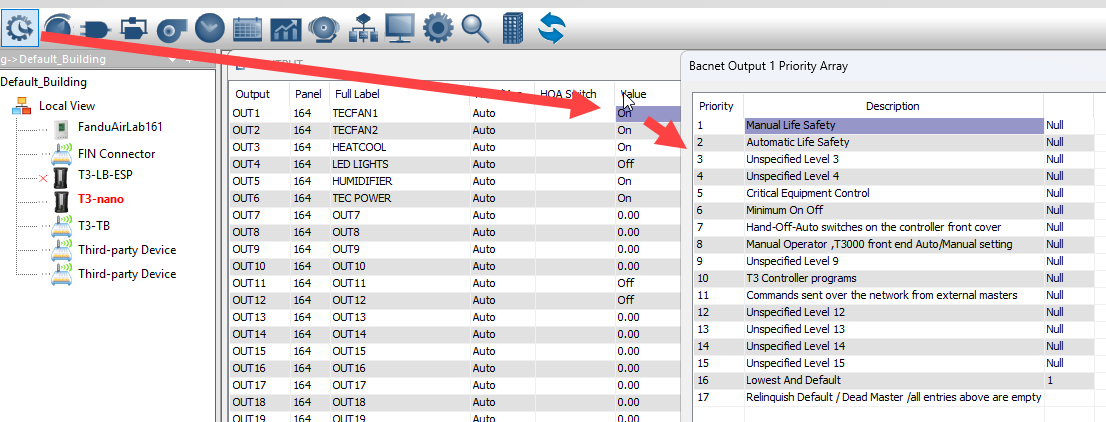
Even with the latest firmware, the hierarchy remains strict. The reason Niagara writes are “failing” at those lower priorities is that something with a lower number is already in the array:
Priority 7: Physical Hand-Off-Auto (HOA) switches on the controller.
Priority 8: Manual overrides from the T3000 software.
Priority 10: The internal T3-BB BASIC program.
If you write from Niagara at Priority 11–16, it is automatically overridden by the local program at Priority 10. It works at Priority 2 because that is a high-level override that beats the internal logic.
How to troubleshoot in T3000
Since you are on the latest version, you can verify this from the T3000 front end:
Open the T3000 UI.
Right-click on the value of the output in question.
The Priority Array will pop up, showing him exactly which slot is active. If he sees an entry at Level 10, he knows his internal program is the one blocking Niagara.
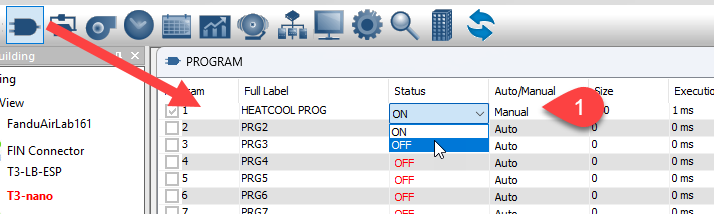
To give Niagara control at its default level (usually 11 or 16), you can turn off the local program temporarily to clear the higher-priority slots. Set the Status to manual then toggle the program off.
Now for the communications issues, here’s a few things to try:
Setting the APDU timeout to 60 seconds isnt a good idea, if its going to fail it’ll fail in under a second. Try putting it back to 3000ms or so.
Move the niagara polling rate from ‘fast’ to ‘normal’ or ‘slow’, this will give the T3 more time to deal with packets properly.
Verify the MSTP network numbers are unique, each device including the T3 router itself needs a unique number on the MSTP network. If the T3 router is set up as ‘Panel1’ on the main ethernet network, you can also set it up as MSTP ID = 1 on the subnet. Then the rest of the subnet devices start at 2 and onwards.
Set the max masters number to match your subnet, this will save wasted polling time and generally let the network run faster.