I have tried to setup my TStat7 similar to the post from Tstat8: Single stage heat, and the “Setting” is changing from 80 (then arrow up to change) and gets to 99, then shows 000, and let it sit for a few seconds and shows 999.
I then arrow down to get off the 999 and arrow up again and it goes to 000 after 99, then up to 009 then to 120.
What is happening here?
I need to manual control for the system and the Heat Icon to show when system out put for Output 1 is closed to make the Mod-Con Boiler turn on and run the system circulator Heat_ModConBoiler_Flushing-4.txt (14.3 KB)
I wanted to monitor input 1 as temperature (type2 thermocouple) for the buffer tank to flush my radiant system.
Make it adjustable from 80 - 140 deg F, with default of 140.
Make it on/off control with 7 deg range of off to on state.
Finally figured out how to do a firmware update by having the device selected and then picking “Download Firmware and Update”.
Not the most intuitive interface!
I would expect there be a way to see the firmware needs to be updated or the ability to select a version in the interface instead of running blind and all of a sudden it starts updating after the above selection.
Although, this doesn’t seem to have changed the behavior…
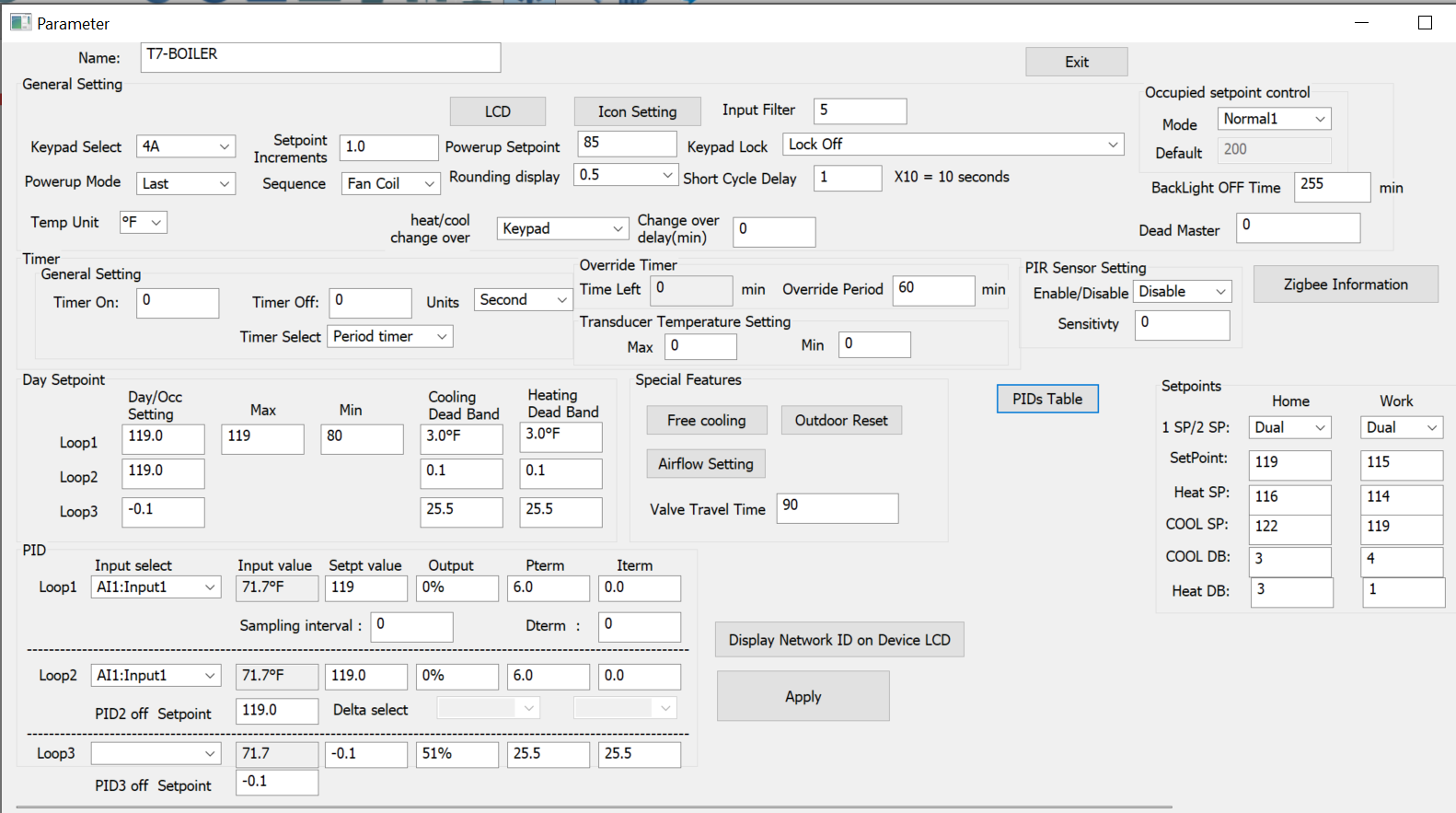
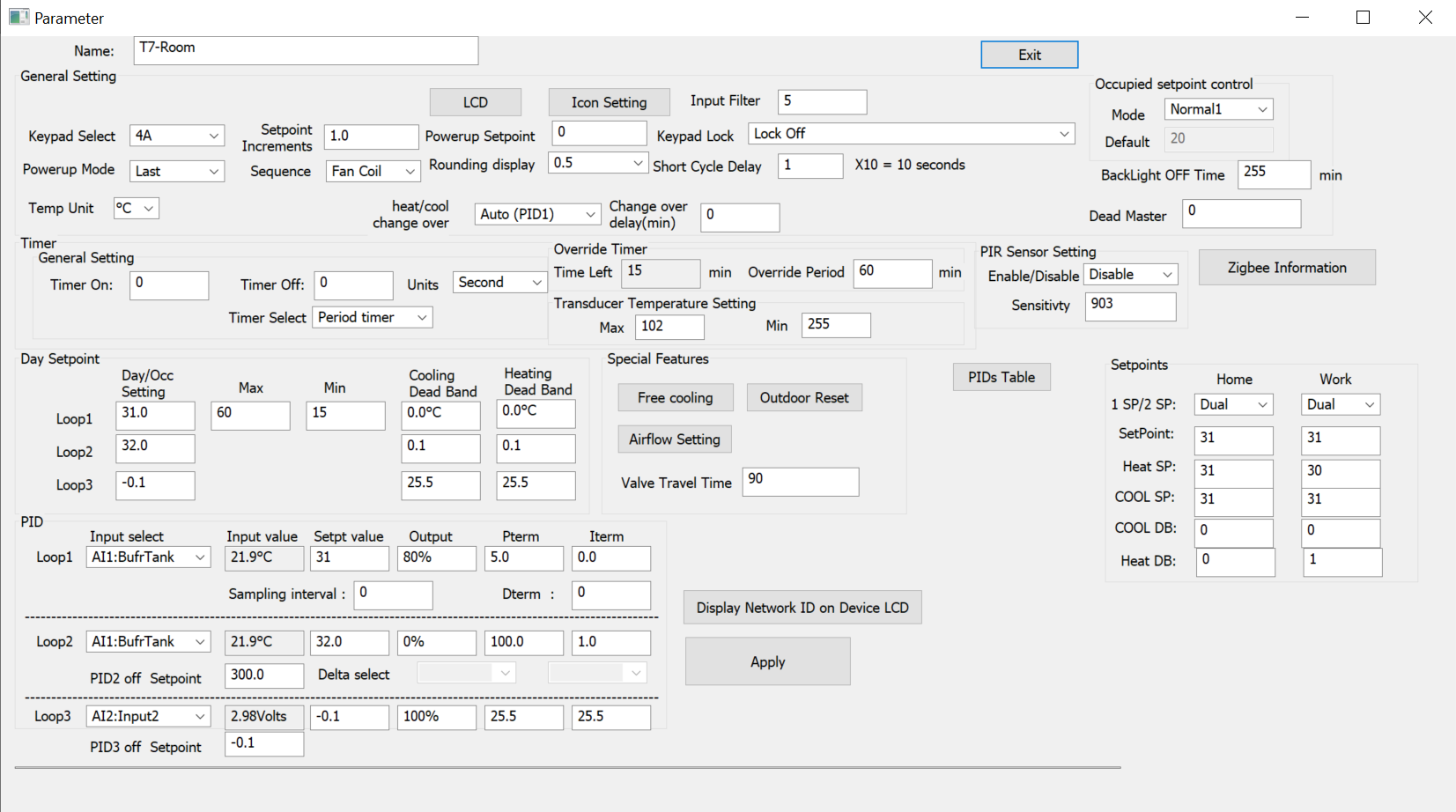
When I went into the Parameters, PID and Day Setpoint values showed 6443 deg F
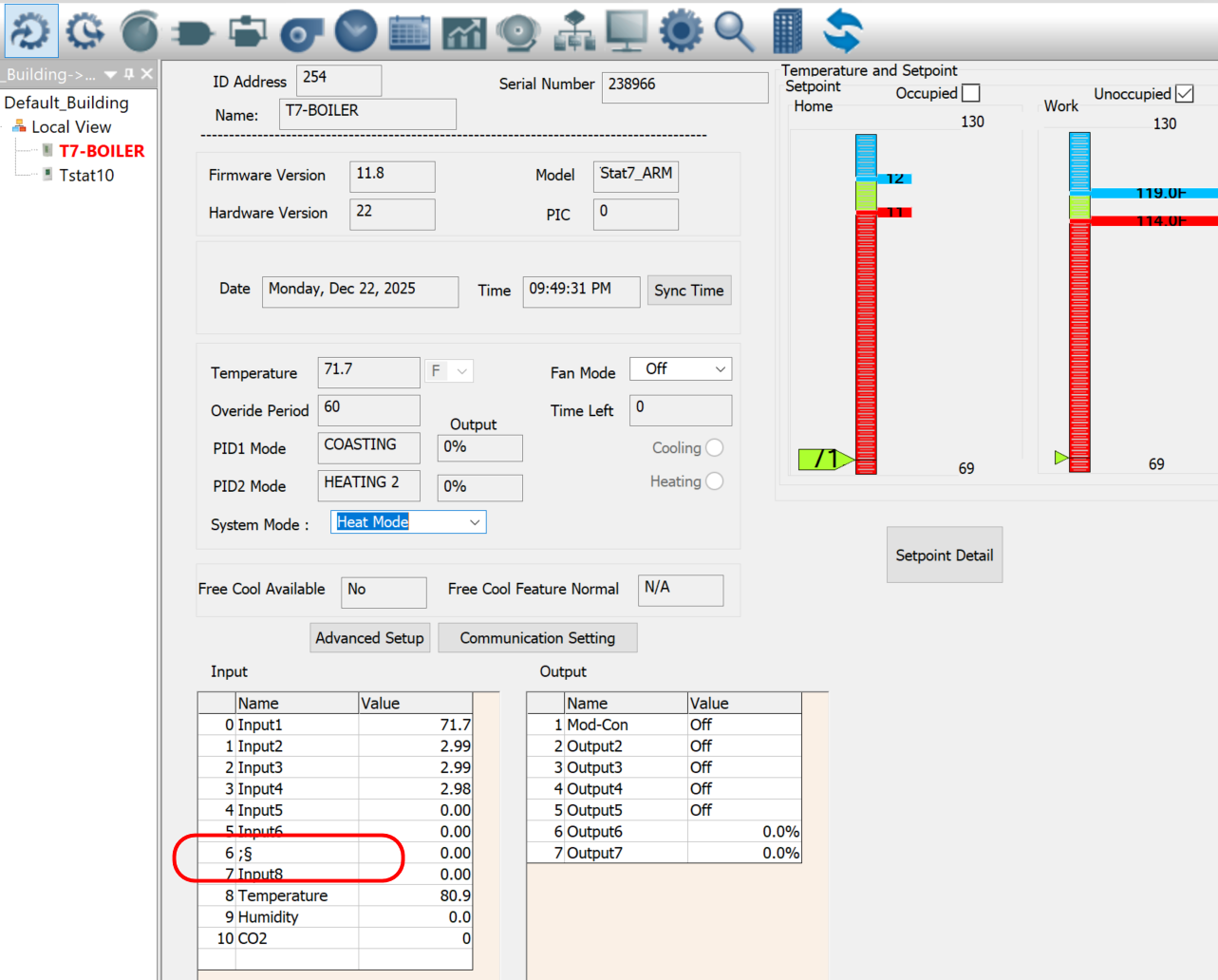
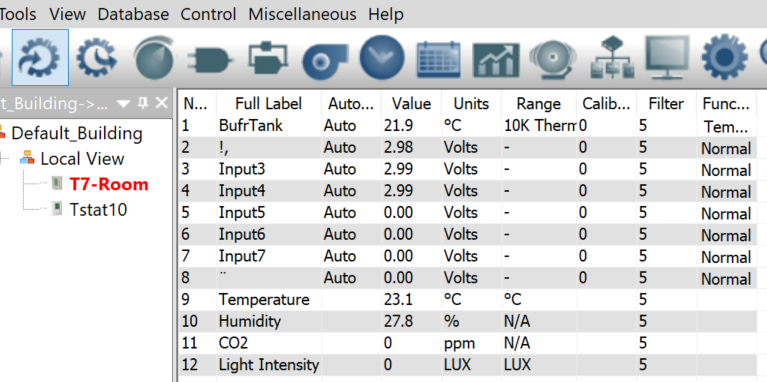
Now I have loaded the program from the TStat8 example and just updating to deg F and renaming the inputs/outputs and the Descriptions keep changing and showing characters that are non-sensical.
I rename them and they change again to junk labels and crazy characters.
From what I have determined so far is that the binary math is not being done correctly since it’s incrementing the 100’s digit when it gets above 99. The 100’s display digit resets to 000 on the display and the increments the 100’s each additional increment of 10 that the temp setting increases.
So, if I set it to 120, the display shows 220.
I have now set the range to stop at 119 and this seems to have corrected the registers from getting corrupt values and having the Parameters PID values jumping all over the place.
Not ideal, but will work for now. I will need to get this fixed soon, as my system is getting commissioned to start heating later this week and winter is here. Without this working correctly, my system temps will no doubt be tool low for using this thermostat on the boiler loop and I’ll have to use something else.
Quite disappointing after buying all this equipment and it not functioning correctly.
Lijun knows about this proejct, he’s out at the moment but we can get him back shortly.
One tip I know is to set the I term to zero, it can wind up and cause confusion with the output states.
Make sure to set the number of cooling and heating stages to the real situation. The defaults are three heat and three cool and I see a lot of folks leaving them there and compensating in the output tables. Best to just set what you have.
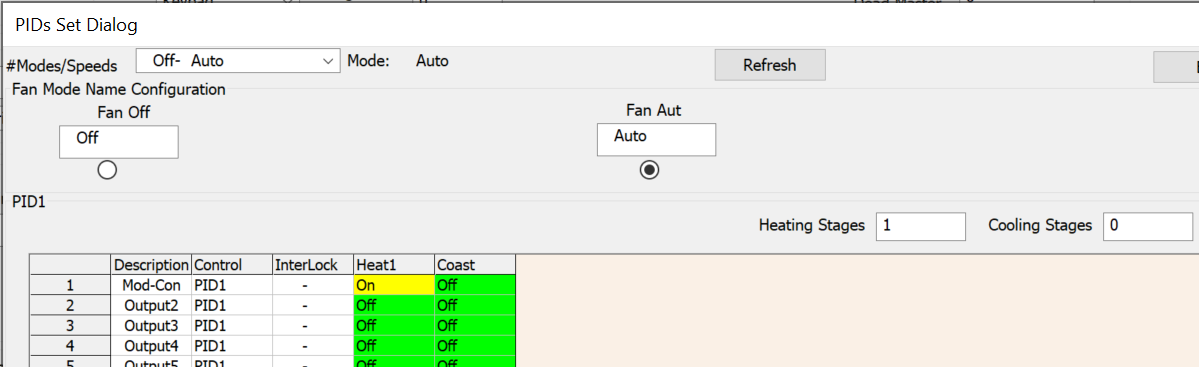
There are several MODES like OFF, ON, AUTO. You will need to configure the output table for each of the modes. This is not always intuitive either.
Lijun will be back at his desk shortly and assist.
I’ll have to reboot my computer to get the screenshots as it’s not cooperating right now. I thought I would jump to the Tstat10, LOL, this is a world of complexity difference. Not likely I will get that working right now as this is the first night trying to configure this equipment.
OK, I don’t remember the MODES output table, I’ll hook up the TStat7 again and look for that.
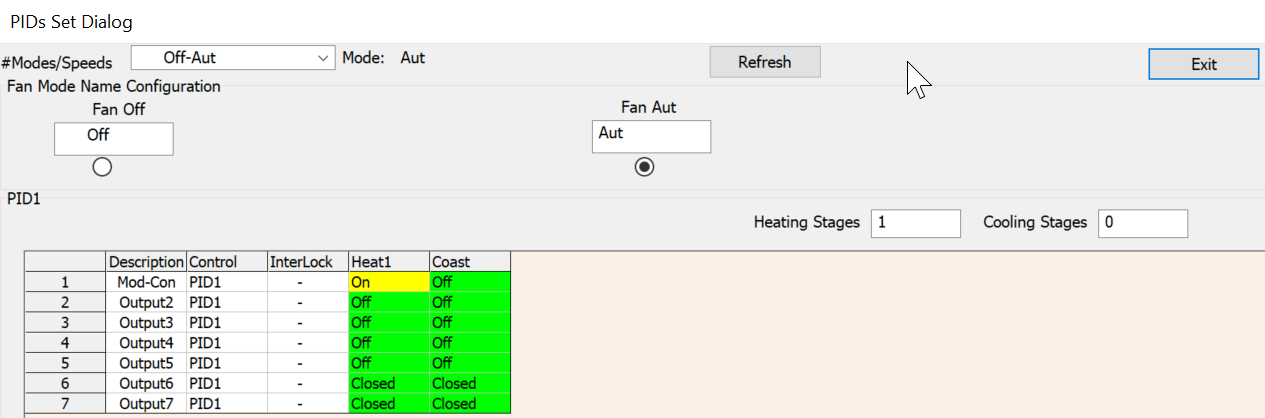
I did set the Heat mode to 1 only and no cooling since I just need to monitor the buffer tank and run the boiler accordingly.
Maurice, I am trying to setup this Tstat7 to monitor my buffer tank and set the temp to selected output, say 140 deg F. This will call output 1 to turn on my boiler until temperature is reached, then turn off the boiler.
That is all the functionality that is needed. 1 Stage Heat. It is not working.
Then set the number of modes to 1.
<This is where we set OCCUPIED, UNOCCUPIED, and so forth, your system runs in the same mode 24x7 so its just one mode, RUN or something similar.
For the staging of the outputs, set stage1 heat, let’s say its output 1, it will be on for stage1 heat.
On coasting, the output is off.
There’s no cooling stages to set.
And that’s about it. I dont have a device or I’d send some screen shots.
Lijun can do a better reply, he should be in the office shortly.
After switching the setpoint to Fahrenheit, there is indeed a problem with how values above 99 are handled. This is a bug caused by the fact that TStat7 was developed and tested mainly in Celsius during early development.
That said, as Maurice mentioned, TStat7 is an older product and we don’t have much engineering time to invest in it right now.
Loading a TStat8 program into a TStat7 is not supported. Their configuration file formats are different. Once a TStat7 loads a TStat8 config, internal parameters will get corrupted. That explains the incorrect values on the Parameters page and the random or garbled input names you are seeing.
I will attach a default configuration file. Please load it to restore the controller to factory settings. Tstat7_Default_Setting.txt (16.1 KB)
I downloaded the settings file and uploaded to the thermostat as well as reflashed the firmware, then uploaded settings file and this doesn’t seem to reset the values of the name fields for the thermostat. I am still seeing the issues with the Input / Names changing when I switch screens.
I then renamed all Input Names and did some settings on the Parameters and it still seems to be changing the Full Label. I have now printed out a ºF to ºC chart to put with the thermostat in my mechanical room.
Reset Device
You could hunt around in the user interface, there may be a button in the advanced settings areas. I dont have a device on hand to check for you.
Names Disappearing
Lijun will check into the issue, its not something I have seen before. After doing some work with configuring and renaming you coud save the file, T3000 → select device → file → save as. The IO names and other settings will be saved in the resulting config file which can be reloaded at any time.
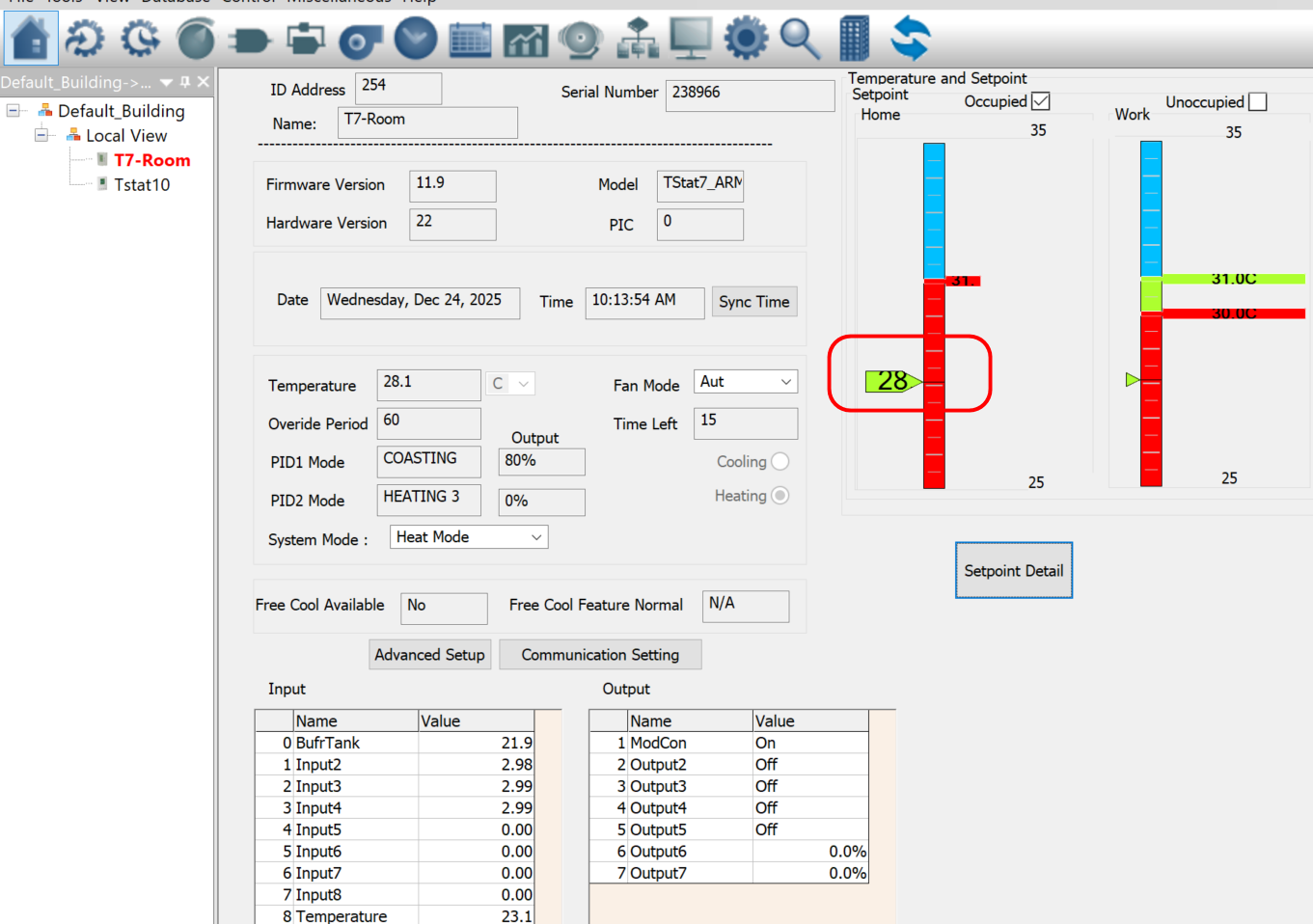
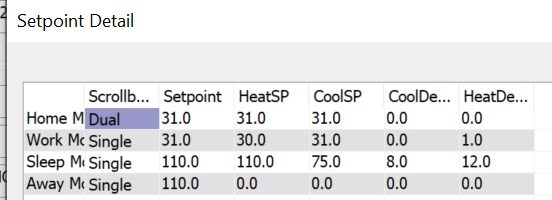
I am not clear on the Modes setting ( I assume you mean the 1st selection Off-Aut? ). Not sure where to set the OCCUPIED, UNOCCUPIED? Here are some screen shots so far.
The “Setpoints” on the Parameter seem to automatically change even if I enter a value.
Where does the 28 value come from on the graph (this seems to be where the heat turns on, but I can’t figure out how I am getting the 3deg delta for it to turn on and adjust that value.