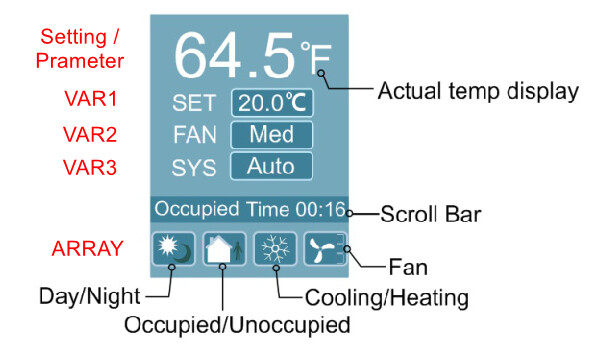
I have been searching and trying to figure out what controls the output of the top most display? Depending on the example program I load, this is either the internal temperature or an On-Off value. I know that the next 3 are controllable through the VAR1-VAR3 settings.
Just for others reference, I just found it very obscured in this post: Tstat10 room temperature disappear - #11 by maurice
This is controlled from the Configuration->Basic Information->Parameter menu picks. I looked for this for hours.

I have updated to the 68 firmware.
Also, I have seen mention of control of the scrolling text and can’t find anything on that topic that is straight forward.
I am using the VAR1 thru VAR3 respectively for SET POINT, BUFFER TEMP, (OFF / HEAT / COOL) and wanted to use the scrolling info to present some other info that may chnage. Like using it for DEW POINT when in cooling and HUMIDITY % and CO2.
Is this possible on the scrolling info?
Lastly, I am trying to understand how to change the ICON display at the bottom of the screen based on different run states of the program. I did find the post here Tstat10 Icons - #29 by jason.kania that talks about the ICONS.
Has this been developed further, or still limited to the stock icons? When configuring this, is this the only way to display the icons with the array variable and calling when to show the icon?