I would like to store Trend Data on an SD card so that I can analyse the trend data using Excel. My T3-BB has an SD card slot.
Some basic questions:
If I insert an SD card (while system running?) and check “SD- card Normal” flag in configuration / settings / basic information - will trend data start being recorded automatically - or are other actions needed?
should I pre-format the SD card? What file system?
What format (eg CSV) is used for data storage?
The on-screen Trend display (which I am updating every 10sec) has gaps from time to time, and also seems to be suspended when editing programs etc. Will the SD-card data have the same data gaps?
Reviewing the on-screen trend data, it appears that the analog trends are not correctly synchronized with the digital trends - the analogs seem to be delayed compared to digitals. Is this plausible?
I currently have 3 trend “monitors” running (ie “ON”). If I have not been looking at graphical trends for a while the trend only displays analog data starting from when I first click “Graphic”. Digital data "back-dates for maybe 15 minutes. Is this normal?
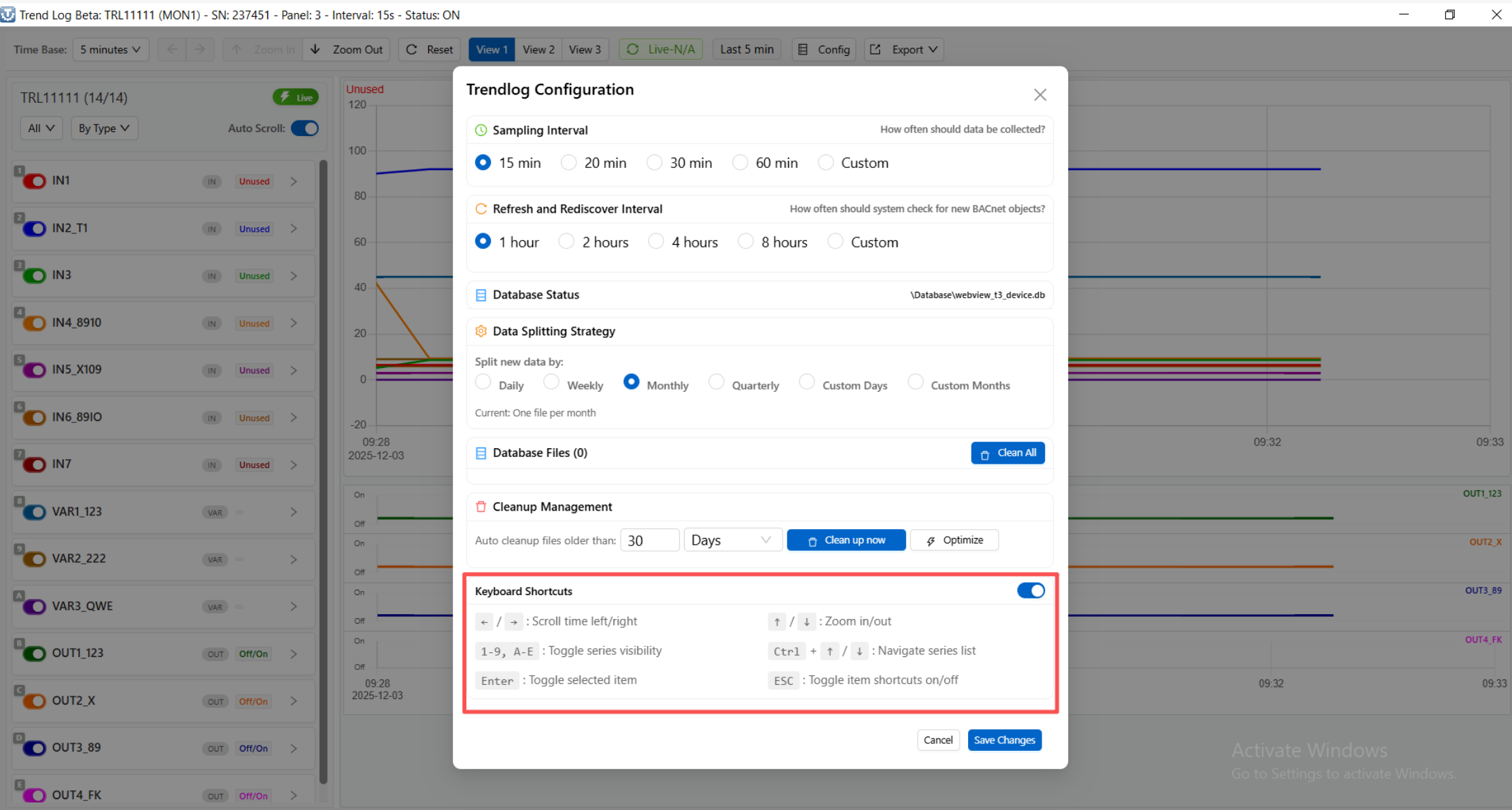
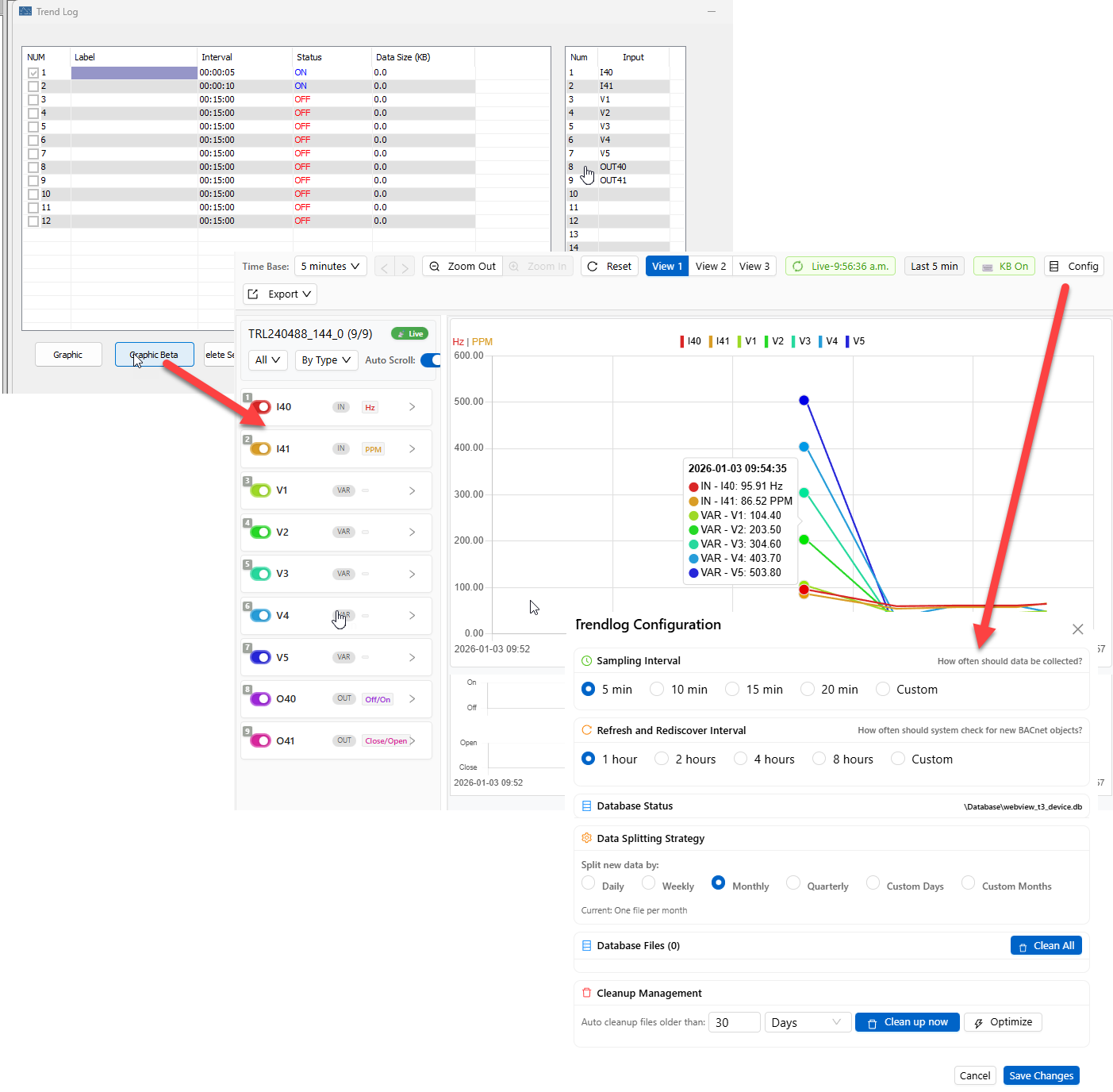
There’s a new trend log system just released which will be better for analyzing and reporting. Just update the T3000 software and set up a few parameters as shown below. The data will be logged to your local hard disk in SQL format.
The only downside is that you will need to leave the PC running the T3000 application to keep the logging going. If you dont have a PC to dedicate to this task you can still get the trend logs from the SD disk as you mentioned. The data is in a binary format which we need to still tie into this new SQL database system. More on that soon.
One work around for now is to set up a Pi with windows to handle the SQL logging.
Heres a tutorial on how to set that up.
Here’s the very simple setup screen for logging EVERYTHING in your building, all inputs, outputs and variables on ALL devices in the building will be logged using this system. Its still in development so we welcome your feedback.
Does this new Trend system cancel the old Trend? Is there any documentation on the new system that I can review before updating?
I am not sure I am ready to abandon the old system without being sure the new system is working properly.
If necessary, can I revert to the old version? (I’m not sure I know how to do that)
I notice the default choices of update-period start at 15 minutes - although custom intervals can be entered. Is 10sec possible?. For debugging and also monitoring fast moving trends, 15 minutes is way too slow.
Just put the SD card in the slot, it will be auto formatted. We tested only wiht the smaller size cards so do look around for the smallest one you can find, 1G and smaller.
Once its detected it should show up in the trend log dialog screen.
I wouldnt get too deep with the trend logs on the original system, it is on the way out. New T3000 installs will use the new trend log system so let’s discuss based on that.
The SD card is a buffer, when the PC running T3000, the ‘server’ you could call it, fires up it can grab data from the SD card to make up for periods when the PC was off. This isnt fully implemented yet, so for now the server has to be running full time. Data stored on the SD is in binary format which will take some real wrangling to be useful.
ON trends are recorded, OFF trend are not recorded.
Each trend is a grouped into batches of 14 items, I beleive.
You can break the file into chunks on the user defined period.
Data is stored 24x7 no matter what screeen is on the T3000 display.
Once the card is full and data keeps coming in, the older data will be tossed out.
The SD card can stay in the device, use T3000 to pull data off it. The data is stored on the Win10/11 PC in SQL format.
Update: Th 8GB SD card worked fine - but I needed to reboot the controller for it to achieve “Normal” status.
The resulting data files are a collection of .BIN files - max 100kB. Some kind of file numbering scheme with suffixes A and D (Analog & Digital?)
Does this mean I am in fact running the updated software?? When I click on the Update T3000 - my current version is Nov21 2025 16. (What does16 represent?).
So how do I extract the data from my files to analyse using Excel??
For now the data is transparently logged by t3000 in the background to an SQL databse. Everything gets logged, all inputs, outputs and variables from every controller in the building. Lijun will write up the latest features.
Currently there is no coordination between the on device storage and the data which T3000 is storing. Next step, we will make it so T3000 doesnt need to be running all the time.
We’re in the beginning stages with this archiving feature. The end goal of course is to have some reporting tools, excel integrations and so on as you describe. For now you will need to search your hard disk for *.sql and work with it from there.
I updated my T3000 today and saw the new features so do an update if you dont see that ‘Graphic Beta’ button.
I tried searching the T3000 PC for *.SQL files but no .SQL files were found with creation dates that matched the period of Trend logging.
Can you provide any clues about where files are put? It is surely not random.
Are the BIN data files true binary or HEX? You must know how the BIN files are parsed to have created them. Also if/how the data is delimited.
Since the SQL system is still incomplete can I revert to the previous trend system to obtain data? I realise you are focused on what is coming around the corner, but I am still working in the present.
Lijun will document the feature first thing on Monday. I have to confess I dont know where the files are stored, when they’re created and whatnot. You can be sure its one of the T3000 install folders.
There will be a good update here soon. The trend log features we’ve been working on are a bit unique for the industry. With one simple checkbox to enable this logging feature, every single controller in the building, every input, output and variable will be logged to the SQL database with near zero configuration.
There’s some details to work out like how to tie it in with the on device SD card. I look forward to your feedback as we fully implement it.