T3-32I BACnet object metadata corrupted after configuration changes

Hi,

We have been testing a T3E-32i / T3-32I as a BACnet/IP I/O module for integration with our control system, and overall the unit is working very well for our application. We have successfully tested the universal inputs with 0–5 V signals and are quite impressed by the number of supported input types.

During commissioning, however, we found a reproducible issue with the BACnet server after configuration changes.

Our unit:

  • Product ID: 53
  • Model: T3-32I
  • Hardware version: 4
  • Firmware: 7.0 (T3_32AI_REV70.hex)
  • BACnet device instance: 247350

After a power cycle, the BACnet objects can be browsed normally. For example, analogValue.18, which represents RANGE1, reports normal string properties such as:


objectName  = RANGE1RANGE1
description = RANGE1

If we then make a configuration change, for example changing IN1 from 4–20 mA to 0–5 V in T3000, the actual configuration is written correctly and works as expected. However, some BACnet CharacterString properties then become corrupted. For example, reads from AV18 have returned values such as:


objectName  = <invalid character>
description = <control characters>T3-AI29

At this point our BACnet browser can also no longer reliably browse the Analog Value objects.

We initially suspected that this was related specifically to T3000. However, we can reproduce the same behaviour by changing an input objectName directly over BACnet. The name itself is written correctly and is persistent, but afterwards the Analog Value string metadata becomes corrupted in the running device.

A power cycle completely restores normal BACnet operation. Importantly, the configuration changes themselves are retained. For example, the selected 0–5 V range and a changed input objectName both remain after restart.

We have reproduced this behaviour with both firmware 6.9 and the current firmware 7.0.

Our current workaround is therefore:

After making configuration changes to the T3-32I, we power-cycle the unit before putting it into normal BACnet operation.

This works reliably for us, but it appears that some internal BACnet string/object data may not be correctly rebuilt after configuration writes until the unit is restarted.

Could you please check whether this is a known issue, or let us know if there is another recommended procedure after changing the configuration?

Apart from this issue, the T3-32I looks very useful for our application. We originally selected it primarily for voltage and current inputs, and were pleasantly surprised by the range of additional sensor/input types supported by the universal inputs.

Best regards,

David Fredriksson

DAVITOR AB
Lijun will report back here, thanks for the good troubleshooting.

We’ll be adding more ranges soon. Basically anything you can test with a multimeter: inductance, capacitance, resistance and of course voltage and current. Lijun will report back on our ‘multi meter project’ status in his reply.

Hi David,

Thanks for the detailed troubleshooting. Based on your tests, this does look like a firmware-side issue related to rebuilding or updating the BACnet object string data after configuration changes. We’ll reproduce it here and check the object name/description handling and configuration update path.

For now, your workaround of power-cycling the unit after configuration changes is fine.

Regarding the multimeter project Maurice mentioned, we are currently revisiting the project and testing the measurement functions again, including voltage measurement. I’ll share more information once we have stable results.

Thanks again for the very useful report.

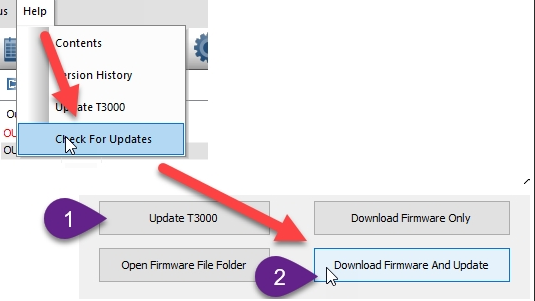
Thank you for your feedback. We’ve reproduced your reported issue and resolved it in the latest firmware rev71. Please update automatically through T3000.

Hi Chelsea,

Thank you — I have now updated our T3-32I to firmware rev71 and retested the issue we originally reported.

The good news is that the BACnet CharacterString corruption appears to be fixed.

I repeatedly changed IN1 between 0–5 V, 4–20 mA and 0–10 V in T3000 without power-cycling the unit. The BACnet RANGE1 object updated immediately, the objectName/description properties remained valid, and I could still refresh and browse the complete BACnet object tree afterwards.

I also ran our complete BACnet object scanner after the changes. It successfully discovered all 85 objects and I did not see any corrupted CharacterString data.

One thing I noticed during the firmware update was that the communication mode reverted from BACnet to MODBUS. I had to select BACnet again in T3000 after the update.

I also did a little additional testing of the RANGE objects over BACnet. For the analog input ranges we tested, there appears to be an offset of 30 between the T3000 range number and the BACnet value returned:

T3000 range 41 = 0–5 V -> BACnet reads 11

T3000 range 43 = 4–20 mA -> BACnet reads 13

T3000 range 49 = 0–10 V -> BACnet reads 19

Interestingly, when writing the RANGE object from BACnet, the T3000 range number itself must be written. For example, writing 41 to RANGE1 correctly changes IN1 to 0–5 V, after which BACnet reads the value back as 11.

So, for the analog ranges tested:

BACnet write = T3000 range number

BACnet read = T3000 range number - 30

I realise this BACnet configuration method may not be an officially documented/supported workflow, but I thought the observation might still be useful.

Thanks again for reproducing and fixing the original issue — rev71 looks good in our testing.

Best regards,
David Fredriksson
DAVITOR AB

Great testing and feedback. Chelsea will fix the 30 offset issue.

Maurice

Chelsea will fix it asap, Bacnet should report the correct number. This is some remnants from old code.

Thanks for your feedback. I have fixed this issue in rev72. The range values in T3000 and BACnet are now aligned.