I am now trying to implement my T3-BB project, but am having trouble getting IP addresses etc set up correctly. I confess not having a good understanding of IP addresses .Previously I have been working with my single PC and the IP address allocation has been happening (by magic!) in the background, but I really need to understand it.
Two big changes from before is that
- I am working on a different local network - the router has IP address 192.168.0.1. Previously my router was 192.168.1.1
- I now have 2 x PCs running (mine and clients) - communicating with the same T3 controller. So the system configuration is as follows:
- 2 x Win10 PCs
- T3-BB controller
- Weintek HMI
- All connected on the same LAN switch. This local router connects to another (higher level) router which connects to the internet
After a week or so I plan to take my PC away and set up port-forwarding to allow remote access to the controller.
A month ago at home the T3 had a stable IP address 192.168.1.233 - regardless of how many times I stopped/started it. Today, when I first powered up driving from my PC with a different router, comms health was initially 0% (red), and “configuration window not available for this device”. I tried the “magnifier” scan icon and it seemed to go through the motions of a scan, but showed a blank screen of scan results. (By the way, the “DONE” button on the Settings window causes a hang-up)
The new router operates on subnet 0 unlike my home router which runs on subnet 1, so I guess the T3 had to learn to look on Subnet 0. Both routers use DHCP.
I dont know how it happened (that’s my point), but eventually I got a pop-up saying the IP address is wrong, so I accepted the suggested change to match IP addresses - and things started working with the T3BB. I still need to re-link the Weintek to the T3 - again - I expect this is an IP addressing issue also.
Although the “self-recognition” scheme is quite good, what I really would like to know is how to “force” the IP-Change pop-up to appear. For a while I was stuck being unable to open the configuration window to access communications settings.
Attached is a screenshot of my current settings window. The IP address shown - matches what’s on the T3 LCD screen.
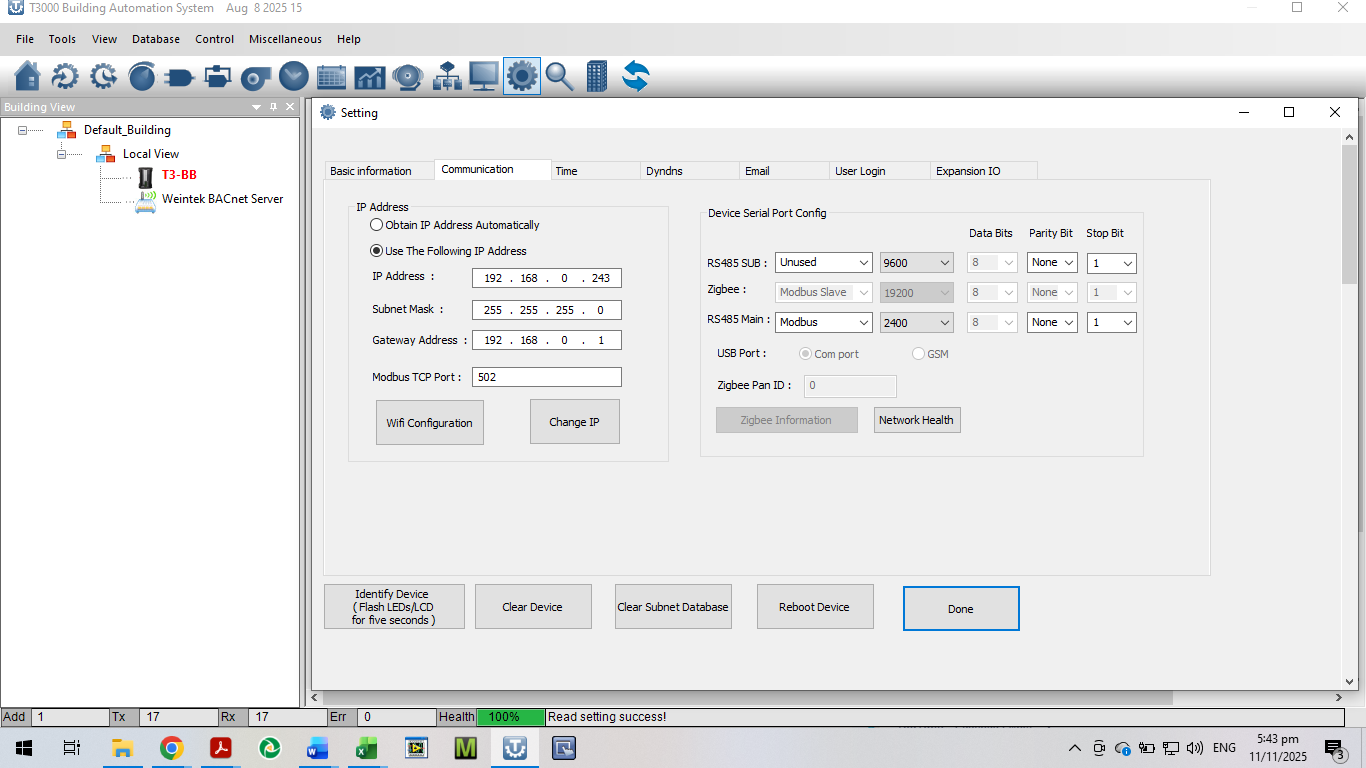
Running T3000 on my PC with building view - when I hover over the T3-BB icon, the T3’s IP address is 192.168.0.243 (same as T3 LCD screen) and the PC IP address is 192.168.0.136.
When I hover over the Weintek HMI icon it reports HMI IP address of 192.168.1.217 and the PC IP address is 192.168.1.84. (as they were when I was at home - obviously wrong now).
I would like to “re-attach” the HMI, but I have forgotten how I did it originally. I think it may have been background magic again that I cannot replicate. I can see all my parameters in BACnet tools. Maybe it will happen by magic again if I can sort out the correct IP address for the HMI.
Running T3000 on the clients PC (there is no Weintek shown attached in building/tree view) Hovering over the T3BB icon, it reports the same IP address (192,168.0.243 for the T3BB, but of course the connected PC has 192.168.0.223. I understand that every connected device must have a unique IP address.
What does the “Change IP” button do exactly? What does the IP change to? Does it ask the router to allocate a new IP? It seems to go through a “reboot” process but did not change the IP address. Maybe the other PC being connected prevented a new IP address from being allocated.
I know my questions are basic, but the T3000 documentation/help is not helpful. - eg the screenshots are no longer current. In general the documentation is useful as a reminder of existing knowledge, not as initial learning
I dont remember how I got the Weintek attached to the T3 initially - I think it must have been “by magic” - some auto-detection thing.
I have done scans - The T3-BB can be found but not the Weintek - it still reports the wrong IP address. I am working on that with Weintek