Real World Program troubleshooting

I am badly stuck tying to activate my program. I was trying to start-up individual program blocks but that wasnt working so I have set up just a few lines of code in an otherwise “empty” program (and switched all other programs OFF)

For testing purposes I am just trying to cycle a variable on then off repeatedly. Code is as follows:

10 REM TESTS 17NOV25
20 REM TEST CYCLING DUTY
30 IF TIME-ON ( V16_P4RN ) > 00:00:05 THEN STOP V16_P4RN
40 IF TIME-OFF ( V16_P4RN ) > 00:00:10 THEN START V16_P4RN
50 DO7_NCRT = V16_P4RN
60 REM IF TIME-ON ( DO7_NCRT ) > 00:00:15 THEN STOP DO7_NCRT
70 REM IF TIME-OFF ( DO7_NCRT ) > 00:00:05 THEN START DO7_NCRT
80 REM V16_P4RN = DO7_NCRT

All other programs are OFF to avoid potential interference - there is no other code running!

I am using DO7.. just as an external indicator.

The problem: Lines 30, 40, 50 do not work. V16.. does not cycle On-Off-On-Off - it just remains with whatever value I gave it manually.

I understand that TIME-ON and TIME-OFF functions work with variables. I monitor from Variable table with constant refreshing.
If I “rem-out” lines 30, 40 & 50, and make lines 60, 70 & 80 active, then DO7 cycles correctly (blue LED) and V16 follows it.

The settings for V16.. in the Variable Table are: Auto, value = On (or Off - done manually, then switch back to Auto). According to Variable table, Units/Range reports On/Off (12), but when I inspect units it defaults to a new selection Off/On (1) - although the selection box at top of screen is correct. I either re-enter 12 and OK, or cancel but the next time I check 1 is again selected. I assume this is just a default entry - what counts is the actual selection shown at top of screen.

Attached is a screenshot showing the range selection window for V16. You can see the “default” selection 1-Off/On as well as the previous selection 12-On/Off at the top. I change the selection to 12 and ‘OK’
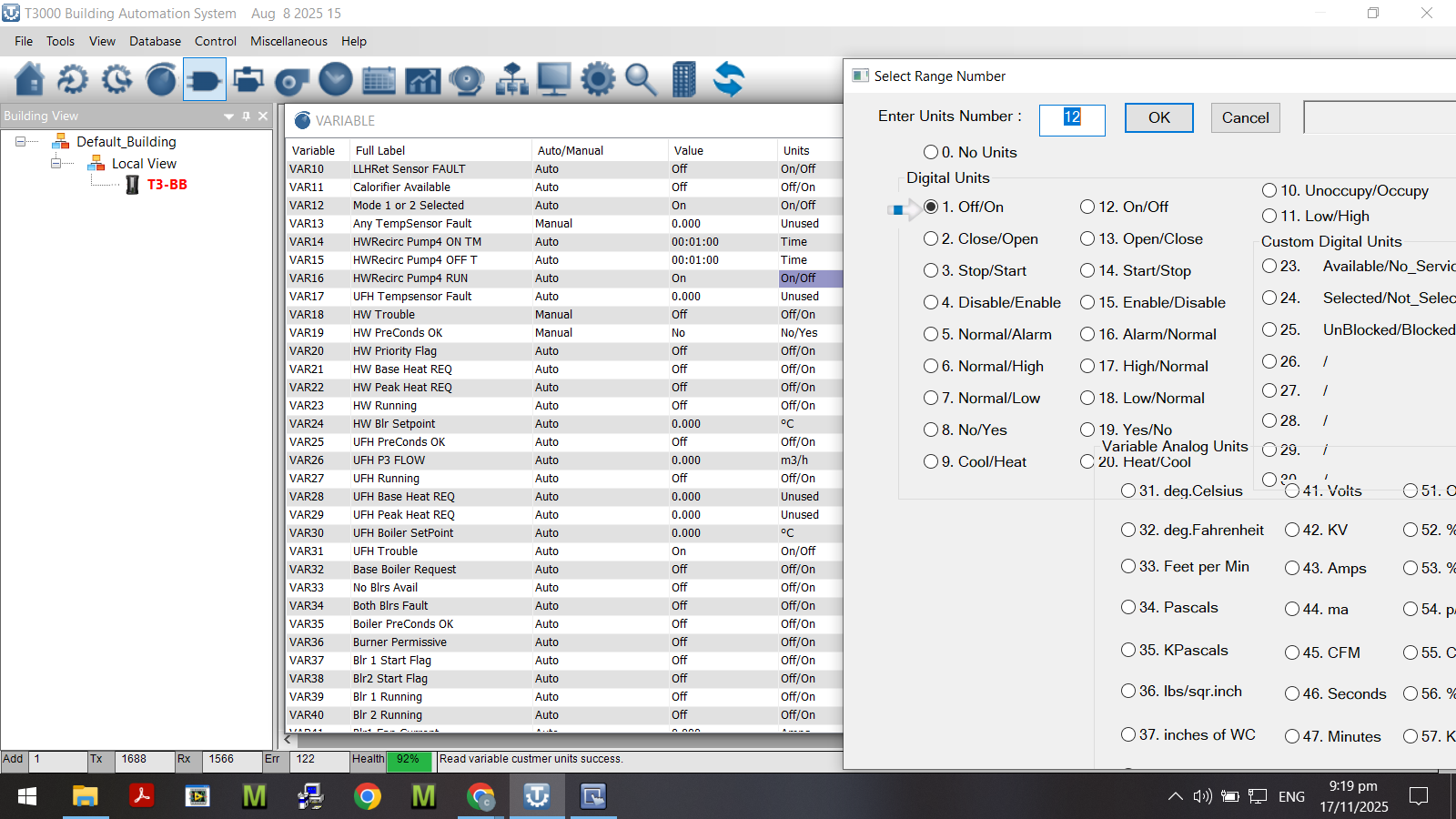
The code syntax seems ok - it matches the example in the manual and it compiles without problem.

I have updated/restarted T3000 software several times - not sure if any actual update has been applied, but several reboots.

How do I get this very simple routine going? I must be doing/not doing something dumb.

I’d start with a simple program

10 OUT1 = NOT OUT1

In some off chance the naming of any output or variable is causing problems, like the underscore, delete the user names temporarily, go with OUT1, VAR1 and so on.

Make sure the variables used for timing are in the units of TIME as opposed to seconds, minutes, hours. Looks like they are correct in your setup.

Make sure the output is in AUTO mode, the prgram is in charge of the output in this case.

Make sure there are no other controllers in the system writing to this output, there is the priority array feature which we grudingly added. If you have programs in onther controllers writing to that output it could affect your program.

Use a debug VAR to hold the timeon and timeoff of the output.

10 VAR2 = TIME-ON( OUT1 )
20 VAR3 = TIME-OFF( OUT1 )
30 IF VAR2 > 0:0:05 THEN STOP OUT1
40 IF VAR3 > 0:0:10 THEN START OUT1

Place the VAR2 and VAR3 on a new graphical display along with all the other items in the program so you can watch them all in one place.

Thanks. In my test program I tried all the simple name options:

  • local variable (simple name eg V120) - no range/units
  • global variable (simple name eg VAR120)
  • global variable (complex name eg V16_P4RN)

All seemed to work if the range/units were “unused”
At one point I could stop the cycle by changing to a defined range/units - eg 1 - Off/On instead of “unused”.
Then, magically (and frustratingly), it started working just as I had coded previously.

I did do one thing - that I did not expect to make any difference - I changed the order of the time-on and time-off. I doubt that contributed.

There is another difference in the final program - I am using the timer variable to drive an AO which in turn drives a relay (I was short of DO).

But then I copied the working test code back into my normal program and it stopped working again.

I put these few lines into a separate program block - and that seemed to work.

This is VERY Frustrating.

My frustration is not helped by the fact (as I have mentioned previously) that about 1/3 of the time when I use Send (F2) it fails - Program X (Not Responding). For every 10 “sends” somewhere between 2 and 6 fail - often enough 2 or 3 times in succession. It takes 45sec for the “timeout” alert to come up - and likely as not it will happen again. Communication health is always >90%.

I lose hours each day to this problem. It can take 10 minutes to “send” a single edit. Is there ANY fix? Does the time-out time really need to be 45 sec? Wouldn’t 20 sec be just as good!

Another gripe! There is an auto-refresh that works during program editing - re-casting the screen from line 10. The refresh can/does come mid-paste I have to re-find where I am working. Is there a way to suppress this auto-refresh?

Time-out gripes:
Send your program, our team will check it out. I agree we can do better in this area and we’re working on it.

Unused Units:
Don’t rely on variables, inputs or outputs with the range set as unused, it will lead to unexplicable results as you describe.

Order of Commands
Should not matter, commands lower down will override the earlier commands is the only rule you need to remember.

Auto Refresh Interacting with Editor
The basic editor jumps around during editing / after a frefresh. I have experienced this as well, we will fix it.