I have several sites that are using T3E-6CT with another vendors PLC communicating with the IO via MODBUS. They work for a random period of time then for no apparent reason the output ranges are set to unused which is causing them to no longer operate the connected equipment. This appears to be a feature of the current revision of firmware. The 3 sites of the 19 in field that are exhibiting this problem all are recent installs with update firmware prior to the install.
Hard to say what it could be from the info on hand.
I think you are saying the sites were in operation for a while and with a recent firmware update they have started acting up. Here’s a couple random thoughts.
-You could try a downgrade back to the original firmware if that would get you going.
heres a link to old versions Index of /ftp/firmware/
-If you can get us a capture of the network traffic we can check through that.
here’s a RS485 capture tool we use for the tricky debugging sessions:
https://docklight.de/
-Try reducing the polling rate and see if that helps.
Standing by to help out.
When we went to downgrade the firmware. We got an abnormal status detected message telling us the module was in ISP mode? They appear to be working properly now but we will have to wait a while to see if they are stable. What causes a module to enter ISP mode?
We have experienced the same issue without any resolution to date.
ISPMode means the device is expecting new firmware from the ISP tool. If you have trouble you can cycle power and start the flash again in the first few seconds after power up.
I have completed the investigation: The bootloader on your device was not correctly updated to the latest version, which causes firmware flashing failures under certain scenarios. More critically, all IO configuration data stored in Flash will be erased, regardless of whether the flashing succeeds or fails. This issue has been fully resolved for all newly manufactured products.
Therefore, the issue you encountered is most likely caused by the firmware update process: your output ranges were erased, and the update itself may also have failed.
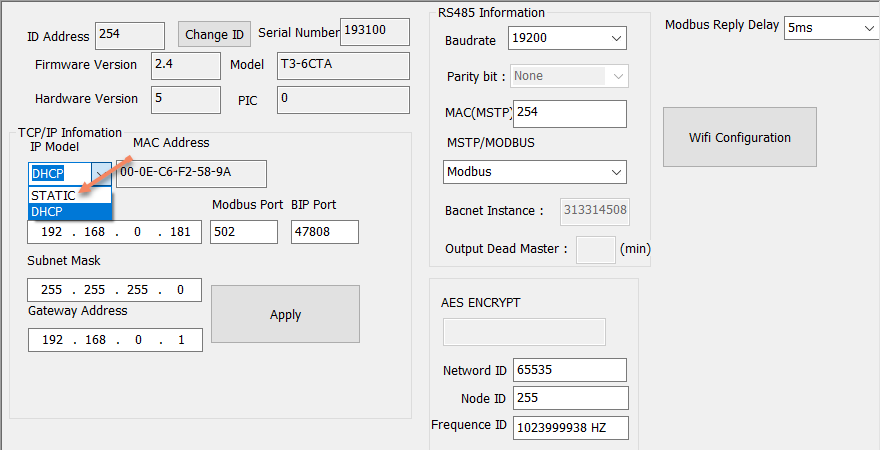
Currently we cannot perform a remote bootloader upgrade for your device. You can refer to the settings in my screenshot: change the network mode from DHCP to STATIC and save the settings. Firmware updates should work normally after this adjustment.
We apologize that you will need to reconfigure your device parameters after the update.
If the update does not resolve your issue send us a note here and we’ll work on it pronto.