I think I may have just reinvented a wheel…
The T3000 software manual/help does not offer any guidance about the sequence/order of logical operations for mixed expressions like:
10 X = A AND B OR C
20 Y = A OR B AND C
I have often inserted parentheses ( ) to force a particular solution, but the parentheses are then removed when compiling.
By working through truth-tables I found that the expressions above evaluate as follows:
X = A AND (B OR C)
Y = A OR (B AND C)
Meaning that a set or parentheses is implied/automatically added around the 2nd & 3rd terms of the expression. Another way of saying this is that logical operators AND and OR are equally ranked for priority but are solved from right to left within a line.
If I wanted to evaluate the expression Z = (A OR B) AND C then I would need to code as follows to achieve the correct result
My usual response on this is to keep it simple for the next guy that is working with the code, 5, 10 years from now.
I stick to one concept per line.
If there’s an intermediate result like a certain mode or condition that can be incorporated into a global variable do that. Don’t bury it into a long line of code and leave the user guessing if the condition is met. The global variable can then be trend logged for analysis later on.
Maurice: Thanks, but I think you missed my point - I must not have explained properly.
The issue I am describing is that Control Basic adds complexity by auto-removing user-input parentheses and inserting “invisible virtual parentheses” during compiling: this introduces “mystery” into how logical lines are executed and this makes code difficult to follow.
eg
User input (a) X = (A OR B) AND C and (b) X = A OR (B AND C) both compile as X = A OR B AND C (parentheses removed).
what runs is X = A OR (B AND C) (virtual parentheses).
So if you wanted (b) the result is right, but if you wanted (a) it is wrong!
To get the correct result for (a), user-input must be X = C AND A OR B
or if you prefer IF C AND A OR B THEN X = 1
I think I now understand this, but it is annoying that the documentation makes no mention of the order of evaluation of logical operators. The docs say to add parentheses to control execution order but the compiler just removes them, and worse - adds new/hidden ones which can yield an unintended result.
For the others who post about auto-removal of parentheses - I hope this is helpful.
I am very surprised you consider a 3-input statement is complicated.
To simplify I would be restricted to 2-input IF statements which is very cumbersome.
(I was hoping to see things go the other way - eg the Block-IF function found in other versions of Control-Basic (eg Johnson Controls))
(Compare with ladder logic where it is not unusual to have 4-5-6 inputs on a single branch and 3-4-5 branches combined into a single output rung)
While expressed algebraically (which makes code a little more compact), my example is just a 3-input IF statement. So,
10 X = A AND B OR C
is equivalent to
10 IF A AND B OR C THEN X =1 ELSE X = 0
Where A B C X are variables
Whether input as ..(A AND B) OR C.. or ..A AND (B OR C).. the compiler removes the parentheses and executes as A AND (B OR C)
So, if I want X = (A AND B) OR C, it must be written X = C OR A AND B to execute correctly.
My main point is that removal of user-input parentheses and insertion of virtual/invisible parentheses by the compiler can lead to unexpected results.
Are you saying I should simplify
10 X = A AND B OR C — 10 IF A AND B OR C THEN X = 1 ELSE X = 0
to:
10 Y = A AND B — 10 IF A AND B THEN Y = 1 ELSE Y = 0
20 X = Y OR C — 20 IF Y OR C THEN X = 1 ELSE X = 0
I totally agree with you, and raise the same issue about a year ago.
Using multiple boolean seem to be a high risk since you can’t have parenthesis and you therefore have no warranty that the order of execution won’t change later.
I don’t agree with Maurice saying to keep it simple, i think that one line with 4 operator and oarenthesis is easier than splitting it in multiple line of code then aggregate them. The first one is way more readable than the second.
Update: We’re adding better bracket support and will update the logic precedence in our docs.
My advice remains: keep it modular. Use simple lines to set your Global Variables, then use a final ‘master’ line for the action. Complex, nested code might feel efficient now, but it’s a nightmare to maintain a decade down the road.
The result of my testing confirms that the operation priority issue in the firmware is exactly as you described. We cannot fix this bug in the short term.
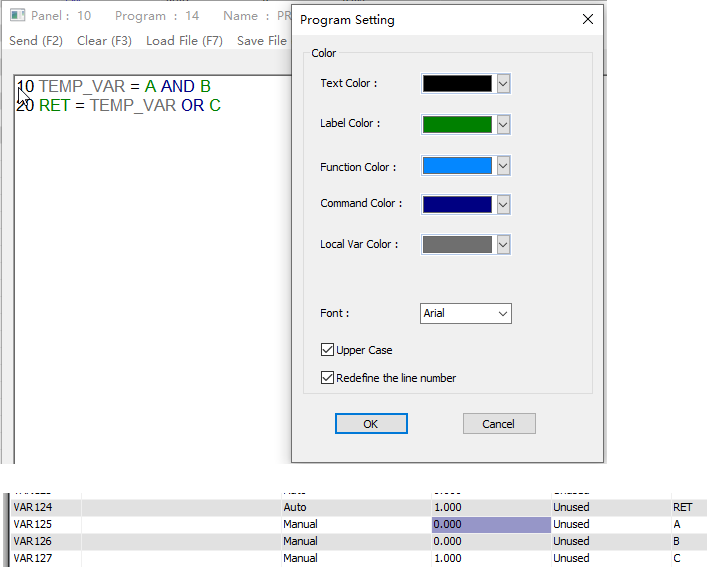
Since this small BASIC programming system is a simplified version, I recommend you use temporary variables to hold intermediate results of the logical operations and make your program easier to understand.
Local variables such as TEMP_VAR in this example shows up in grey to confirm its a local varialbe.