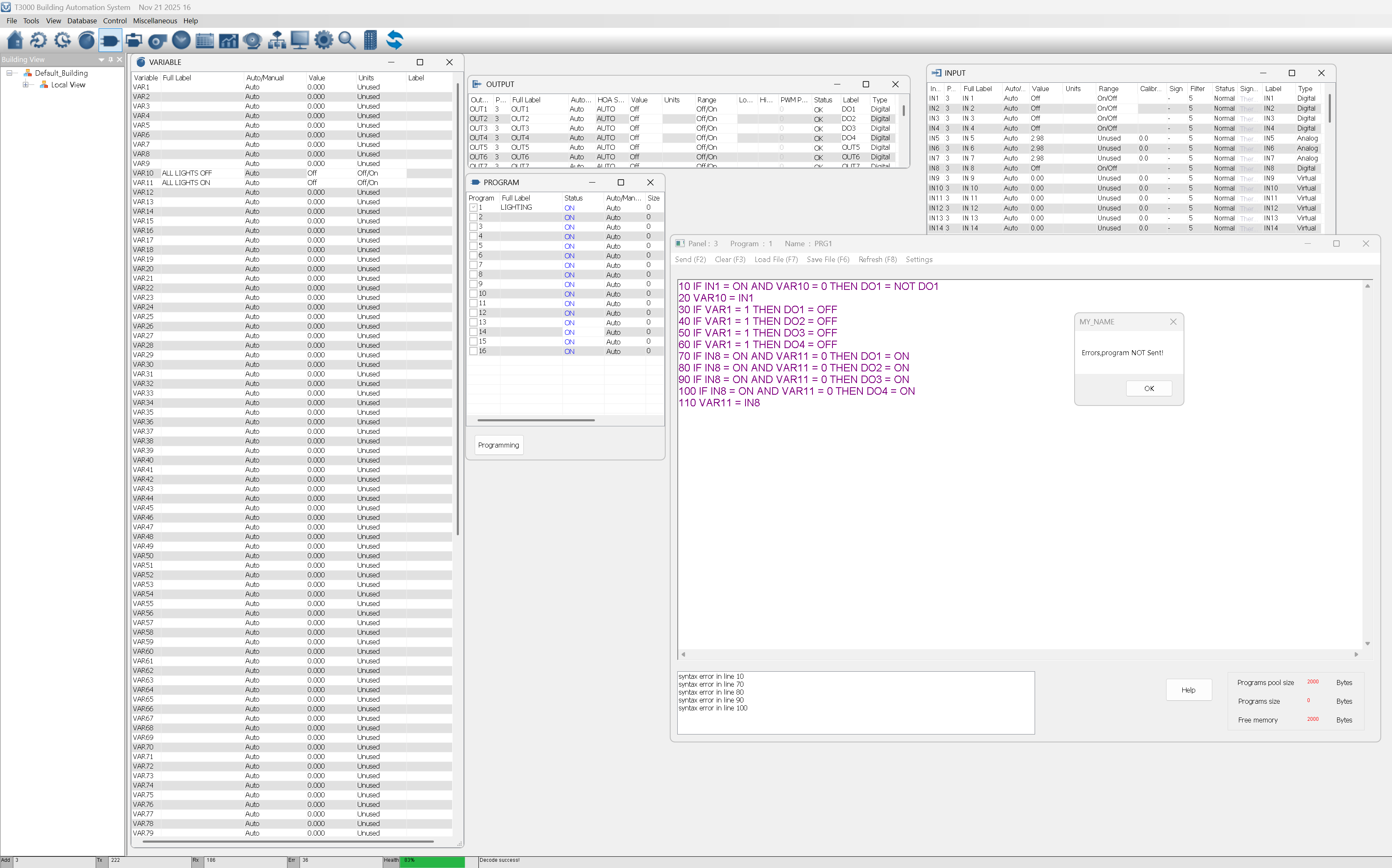
Hi! I have a building where there are currently old-school latching relays everywhere, with single N/O momentary pushbuttons for the lighting control. I need to integrate this into the BACnet system that they have.
I need a program that does the following:
Ex: momentary activation on Input 1 causes DO1 to latch on. On next momentary push, on Input 1, DO1 turns off
Ex: Turn off all Lighting that remains on when closing the building
Ex: Input 8 going activation will cause all light to turn on.
This is my first project with the T3000 platform, and I am struggling to find the latching function that we have on the PLC’s that we usually work with. All the outputs will drive contactors for the 347V lighting, and the inputs are all straight N/O dry switches.
10 IF IN1 = ON AND VAR10 = 0 THEN DO1 = NOT DO1
20 VAR10 = IN1
All lights OFF when VAR1 = 1 (building closing)
30 IF VAR1 = 1 THEN DO1 = OFF
40 IF VAR1 = 1 THEN DO2 = OFF
50 IF VAR1 = 1 THEN DO3 = OFF
60 IF VAR1 = 1 THEN DO4 = OFF
IN8 turns all lights ON
70 IF IN8 = ON AND VAR11 = 0 THEN DO1 = ON
80 IF IN8 = ON AND VAR11 = 0 THEN DO2 = ON
90 IF IN8 = ON AND VAR11 = 0 THEN DO3 = ON
100 IF IN8 = ON AND VAR11 = 0 THEN DO4 = ON
110 VAR11 = IN8
VAR10 is used to detect the rising edge of IN1.
VAR11 is used to detect the rising edge of IN8.
“NOT DO1” performs the toggle function
Hi Lijun! Thanks for the quick assistance! I set up the program on my T3-TB-8i, and it seemed to throw errors on the program immediately, please see the following:
I need to apologize for this — it was my oversight that caused the error.
In the T3000 language, ON is a reserved keyword for “ON n GOTO/GOSUB”, so it cannot be used in conditions like IN8 = ON or DO1 = ON.
Also make sure the related INPUT and OUTPUT are set to Manual mode while testing the program.
Thank you Lijun, I removed all “ON”'s and added IN7 for an “ALL OFF” contact, works great! I have attached the program below for 4 input and 4 outputs in case anyone wants it:
10 IF IN1 = 1 AND VAR10 = 0 THEN DO1 = NOT DO1
20 IF IN2 = 1 AND VAR10 = 0 THEN DO2 = NOT DO2
30 IF IN3 = 1 AND VAR10 = 0 THEN DO3 = NOT DO3
40 IF IN4 = 1 AND VAR10 = 0 THEN DO4 = NOT DO4
50 VAR10 = IN1
60 IF VAR1 = 1 THEN DO1 = OFF
70 IF VAR1 = 1 THEN DO2 = OFF
80 IF VAR1 = 1 THEN DO3 = OFF
90 IF VAR1 = 1 THEN DO4 = OFF
100 VAR1 = IN7
110 IF IN8 = 1 AND VAR11 = 0 THEN DO1 = 1
120 IF IN8 = 1 AND VAR11 = 0 THEN DO2 = 1
130 IF IN8 = 1 AND VAR11 = 0 THEN DO3 = 1
140 IF IN8 = 1 AND VAR11 = 0 THEN DO4 = 1
150 VAR11 = IN8
Another Quick question: If i wish to toggle AO1 (Set to 0-10V) between two values on a pushbutton on IN5, say 5v at off and 10v on, how would I do that?
Thanks!
Additional note:
Use the IF+ statement rather than the IF statements. This way if the user pushes and holds the button down it will only activate one time, on the leading edge of the button hit.