Houston we have a problem…I am unable to make a program back-up.
I have just now updated T3000 software (when I look in T3000/Database/Update the file “T3000 Version” refers to version 20260316)
I am doing what I have always done:
File / Save As /
pick a location - usually C: Programs x86 / T3000 / Database /Buildings / Default Building. File structure is fully visible/navigable.
enter a file name - usually similar to prev. with new date
check file type .prog
click “save”
The bottom bar of T3000 screen narrates through various steps, green bar extends until “Save config file success”
BUT
There is no file with the name in the location. I have tried various other names/locations no result. Seems that the .prog file is created correctly but just doesn’t write anywhere. I even tried over-writing an older file name - but that failed.
This started 2 weeks ago but I didnt notice until recently (ie both earlier version and latest update.. I have tried this many times now with no success. My last successful save was in February.
I am now extremely vulnerable with no recent back-up accessible.
How do I fix this???
I have another copy of T3000 on a different PC that I use off-line. This had not been updated for some time.
(I still dont know how to check the current version - there is no “About…” feature. I did find a file called MINI-Revision which showed rev67.8.)
I successfully "Save"d to a location/file name .
I then successfully performed a T3000 update.
I then tried to “save” again to the same location as before but with a new file name. Again, the Status line responded - stating “Save config file success”.
However, the file was NOT saved to the location - nor to anywhere in the Programsx86 / T3000 folder.
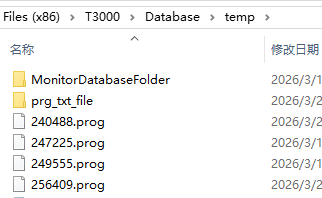
Poking around in the Programs (x86) / T3000 folders I found T3000/database/temp and here I found the last-saved [panel serial no].prog file as well as the folder prg_txt_file which has a complete history of program txt files. This seems to allow an alternate recovery method.
What I conclude from these tests is that the inability to save a .prog file was caused by updating T3000. This seems a serious bug- are any other users affected??
Per email request, attached is the last file created via “Save As..” Edge program 21Mar26.prog (65.6 KB)
I created this file by “Save As..” on an older version of T3000 (sorry - version unknown). This system has a virtual device.
Then without making any changes to the program, performed a T3000 update (version 16 March 2026 “8”) and performed another “Save As..” operation - but no file was saved.
As described, T3000 status line progressed through the normal steps and announced “Save config file success”, but no file resulted.
This replicated my experience with another PC driving my “real” T3-BB device. Since performing its update it will not save a .prog file either
My Save As.. problem does not seem to be getting resolved, but I need to progress.
Please explain how the T3000/Database/temp folder works. It has a single file named [panel-serial-no].prog. Its Date modified suggests it is regularly updated - although no older copies are retained
Is this file a full copy of the current controller program - ie the same as would be generated by Save-as - just with a default location and file name??
What “triggers” saving of this file? It seems to be automatic - it does not require any “Save” action by me
How come only 1 copy/version is kept here? (by contrast I see that the “prg_txt_file” folder has numerous old versions of the different programs.
It seems I might be able to regularly make copies of the .prog file in the temp folder and keep these as backups. Is this correct??
Those files are used internally to T3000 as a cache, I would not rely on them for your work. Our team will study the post here and report back first thing. They will straighten out the questions raised here and they will also document the logic ordering and bracket questions in your other post.
Update: I stand corrected, you can use them to recover older versions. Thanks Fandu