I am working remotely on a project which is now live. I used my work laptop to create a new version of program 11 (of 16) on a virtual device that I wanted to load onto the remote PC permanently connected to a T3-BB. I am using RemotePC - which I have found great.
As I had done before, I emailed the new program txt file and copied it to the remote laptop T3000 directory, then opened the program 11 window, and loaded the new txt file (overwriting the old version). The new file appeared in the window and I was able to “send” (Resource compile succeeded) and save the new version. The reported size matched the source. On later attempts I noticed “decode error” in the status line. I found the same result importing a txt file into a different, empty (sub) program. If I re-type al the txt then it seems to work - but I have “loaded” many files before??
However when I closed and reloaded Program 11 (the one I just sent and saved) I get a completely blank screen. No matter how many times I repeat the load-send-save cycle there is nothing in the program 11 file. How do I solve this???
I noticed that the Program11 window header was more faint than usual - does this mean anything? see screenshot
I restarted T3000 on the remote PC - which then lost/corrupted my other working programs (various outputs changed from manual to auto, my trend set-ups disappeared etc). I restarted T3000 again and found it had reverted to a slightly earlier version (which I had also sent/saved). Now I have to restore my program that was working fine. I have checked - my T3000 is the latest version.
I still have a lot of trouble with “not responding / download time-out” when sending. I know I could spend a lot of time researching why - but I keep judging it will be quicker and easier to persevere inspite of this.
Some basic questions:
what EXACTLY does the Refresh (F8) function do?
I understood it backloaded the program from the T3 - but I have also had it clear a program.
None to the Function keys work in programming - I mouse-click instead. Is that normal?
when I am driving various outputs in manual it is hard to get selections to “stick”. I see the status line reports what has been successful - but it can take 4-5-6 attempts to manually “enter” a value for an analog output or variable. Sometimes it works with mouse clicks and sometimes “enter” - but not reliably. Is there some trick? Is there a speed limit on mouse-clicks etc?
Strange Things:
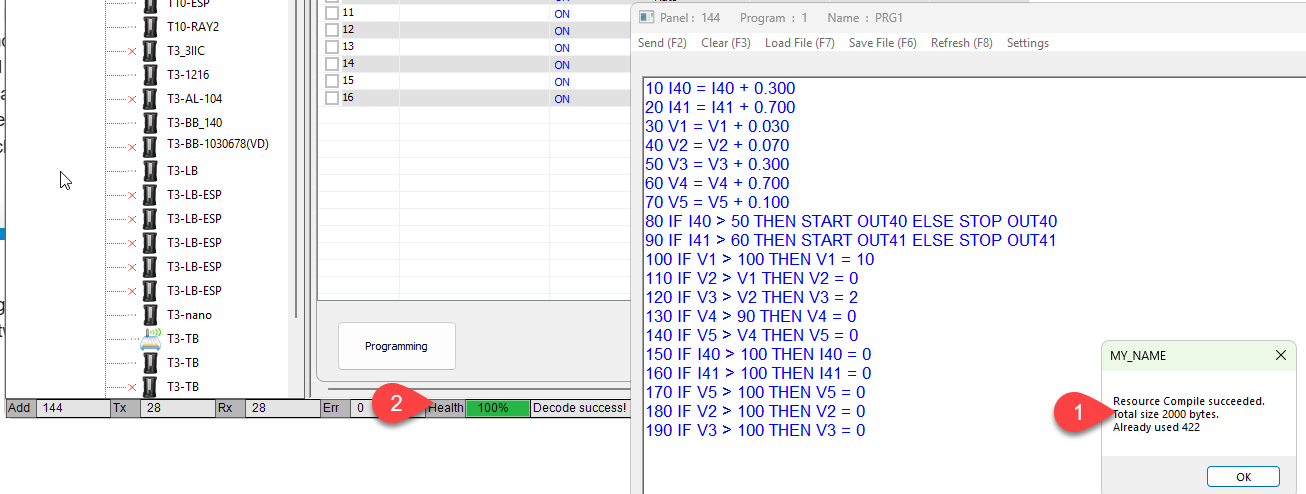
I can only guess this is due to poor communications. Check the status line down at the bottom to see the network health at Tab1. If its not 100% then packets are being lost and you need to use wireshark to diagnose that.
Function Keys:
I tried hitting function key F2 to send, it works fine as shown at Tab1. Perhaps your RemotePC is not pushing the F function keys on to the remote PC.
F8: This reloads the program from the controller back into the editor. Say you send a program using IN1 in the logic, hitting F8 will load the program back to the editor with IN1 replaced by the 8 character user name, OAT for example. We’ll make it more clear what is going on there in the next release.
I use a standard laptop screen - and when the program window is open it blocks the status line from view - so its hard to tell what it is at the point of sending. Health is 90-97% when I can see it.
As I said, I get a “compile success” message when “sending”, and the main program memory registers the correct file size. Its just that when I close the individual program window and try to reopen it there is nothing! It doesnt happen with all 16 programs. I can see the status line for a brief glimpse as the program tries to open - something about “read part… success”. After I close the failed reload the status line shows “decode error!” .
I have experimented with both reentering by hand and copying the program a few lines at a time, sending and saving which sort of works until it doesnt!
I wonder about reinstalling T3000 on the remote PC to repair whatever is wrong? Is there a way to “re-do” the latest update? Can I do a full reinstall T3000 without losing all my work? I am concerned that with the “new” version I will have to reconstruct the local network with different IP addresses etc, This will be fairly tricky to do on a remote PC. Obviously I will take a project configuration back-up - does this retain all the IP addresses etc etc?
you are probably right that my local Function keys dont transfer to the remote PC.
Update:
I discovered that two separate lines were combined into one. When I fixed that, the program saved and re-loaded correctly - “decode success”.
I am very surprised T3000 did not report any error when “sending” the original faulty file.
This raises a further question about the “send” step. If there is a syntax error, a pop-up reports this. What is the correct response to the pop-up??
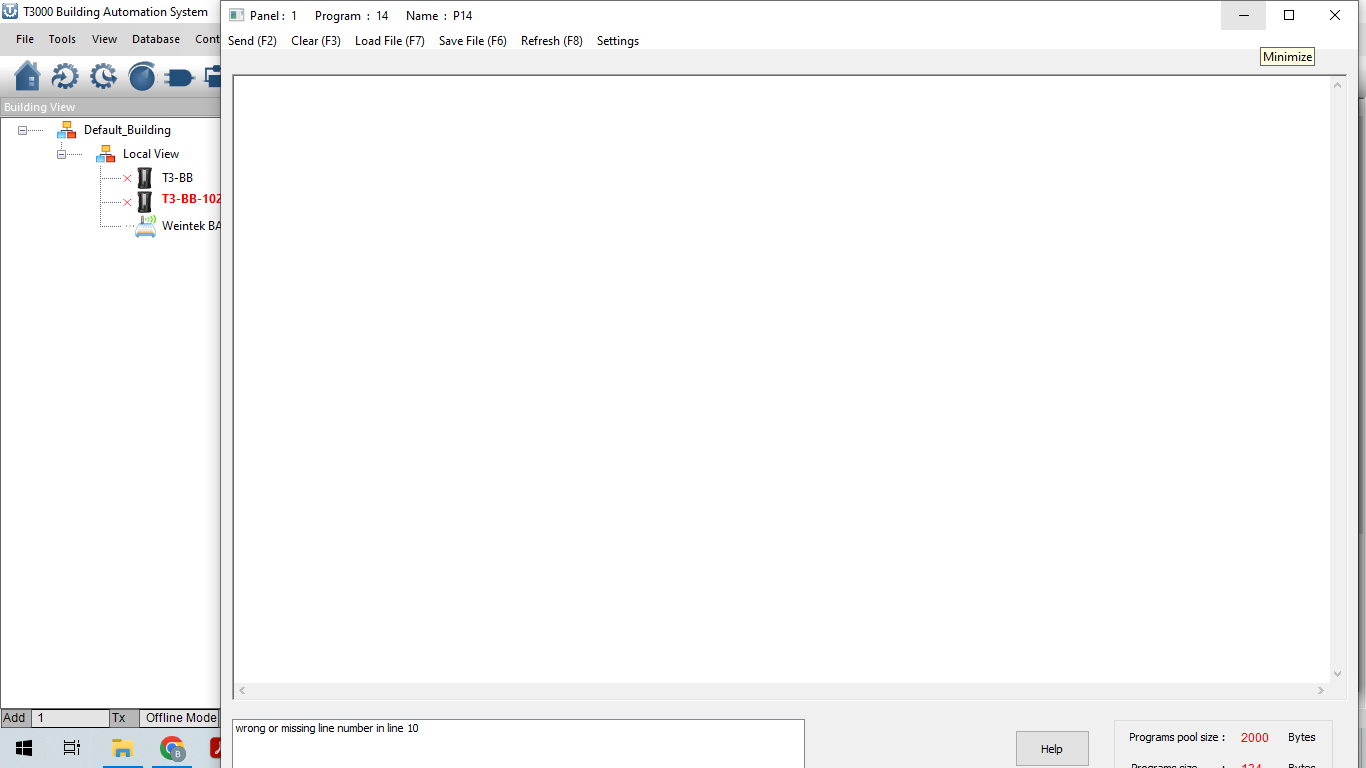
If I click OK or close the pop-up, the program screen goes blank. Then I have to load the previously saved version and redo the recent edits and correct the error.
It would be much better if the system responded by simply reverting to the (faulty) file on screen to allow correction of the error.
A REALLY useful improvement would be to add another button to the “Program” screen to “force” a “syntax check”. The background syntax checking seems to occur fairly randomly - sometimes it helps but often it is a nuisance as previously posted.
Another idea: if the Green/Red “Health” indicator was positioned to the far left of the status line it would be visible when the program window is open.
Syntax Errors
Reading quickly through all this, I beleive most of it is from handling the programs as txt files. Depending on the editor it can introduce LF and CRLF errors along the lines of what you describe. Use a dumbed down editor like notepad for saving and editing of text externally.
Disappearing Programs
You mention after a send and there’s a syntax error, you clear the popup and suddenly your program is gone. Re-reading your notes just now I see its after loading a txt file, we can check into that.
Going a step further, we can make debugging smoother, like highlight the error and move the cursor into position to get started. Also better checking for CR and CRLF when loading TXT files. I will write this up for the team.
T3000 Reinstall:
Our software is fairly lightweight when it comes to installing and uninstalling. You can delete the folder and its gone. You can save multiple install packages and install in different folders to go back and forth to different versions. The cache is all maintained in the install folder and there’s no registry settings fighting each other that I am aware of.
The original program I was trying to transfer was created in my local T3000 (virtual device), saved as txt file (in T3000) then transferred and reloaded into the remote T3000/T3-BB. I only use Notepad to view, print and occasionally edit programs.
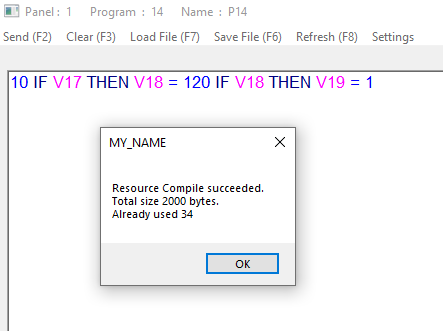
Looking back at the email, I see the “double-line concatenation” in the transferred file. I dont know how this error was introduced. The resulting single long line included two IF-THEN statements yet it was accepted by the compiler (F2 send). The error prevented reopening the file (decode error) - but harder to troubleshoot.
The line-by-line transfer worked OK until I transferred the double-line.
As an experiment I deliberately created a program containing a line of code comprising 2x IF THEN statements in the same line. The screenshot below shows the faulty code and that it was successfully “sent”
I would expect this error to be found by the syntax checker/compiler
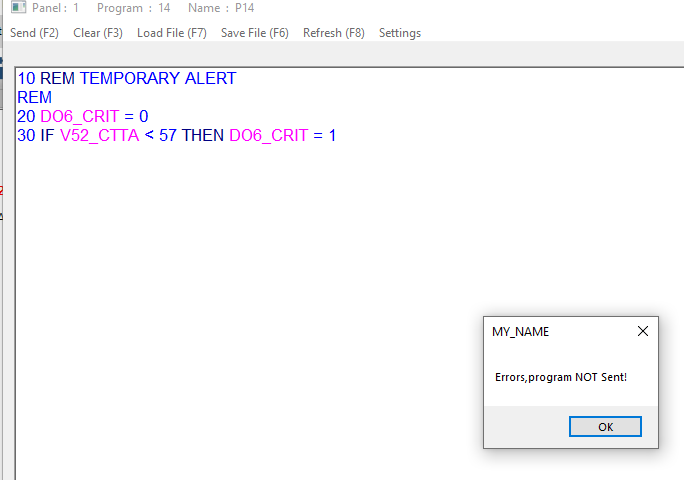
On the subject of recovery from “send” errors - here is a screenshot of attempting to “send” a small program with a deliberate error (un-numbered REM in line 2) - note error pop-up.
clicking on the “OK” button (or closing the pop-up) results in a blank program screen per the following screenshot . The only option then is to close the program window and reopen the same program.
Incidentally, I noticed another two-line-concatenation occurred as a result of editing at the same time as a “background-refresh-syntax-check”. The background refresh re-casts the code listing on screen and since I type looking at the keypad rather than the screen, I can easily mis-type a backspace
I have flagged the two line concatenation issue in the github repo, you can make sure I got the issue down right, check the status of old issues, create new issues and so on.