Hello, I have a couple of systems that I would like to use the RTS2-N-LCD Setpoint displays on, but have not had much luck getting connected to them. I can connect “occasionally” if I hook them up direct to my PC with a USB-RS485 adaptor, but not reliably. If I have them connected to the T3-LB, I can only ever get one to show on the network tree, but if I try to interact with it I just get a “device not connected” message.
When I had them connected individually I made sure to set the addresses and baud rates. I’m confident the RS485 wiring is not the issue, since I have taken everything off-site and bench tested to try to resolve the issue.
It looks like these displays come shipped set for modbus, so I have spent most of my time trying to get them to work that way, but have also tried switching to bacnet with no better luck. I expect there is something I am missing, but I am pretty green when it comes to network stuff.
The RTS2 series is a plain bacnet/modbus device as far as I can recall. It can be integrated but there’s no UI in the T3000 interface. Can you give it a go with the Modbus or Bacnet tools to talk directly to it over the raw protocol and see what you can see.
Note to self: We need a UI in T3000 for this device.
Thank you for the reply. Unfortunately, my abilities with modbus and bacnet are pretty limited, so when things don’t work I never know if it is me or the device.
I can connect to it directly (only one at a time though) with my PC and can read the temp, etc, but if I connect it to the rs485 network on the T3-LB, it doesn’t show up with a search. I’ve tried reading the temp with a program on the T3, but no luck.
I currently have the system functional using just thermistors sensing the different spaces, but it would be nice if the user could change the setpoints, since this is a standalone system. Is there a different device I should be using for this application? I could use standard thermostats connected to the T3 inputs, but then I wouldn’t be able to override the user setpoint with the program.
Thanks for any advice you can give a dumb sheet metal guy who’s trying to get better at controls.
We just tested the RTS2-N-LCD here and can confirm it does communicate in T3000 and has a proper interface. This looks more like a communication setup issue.
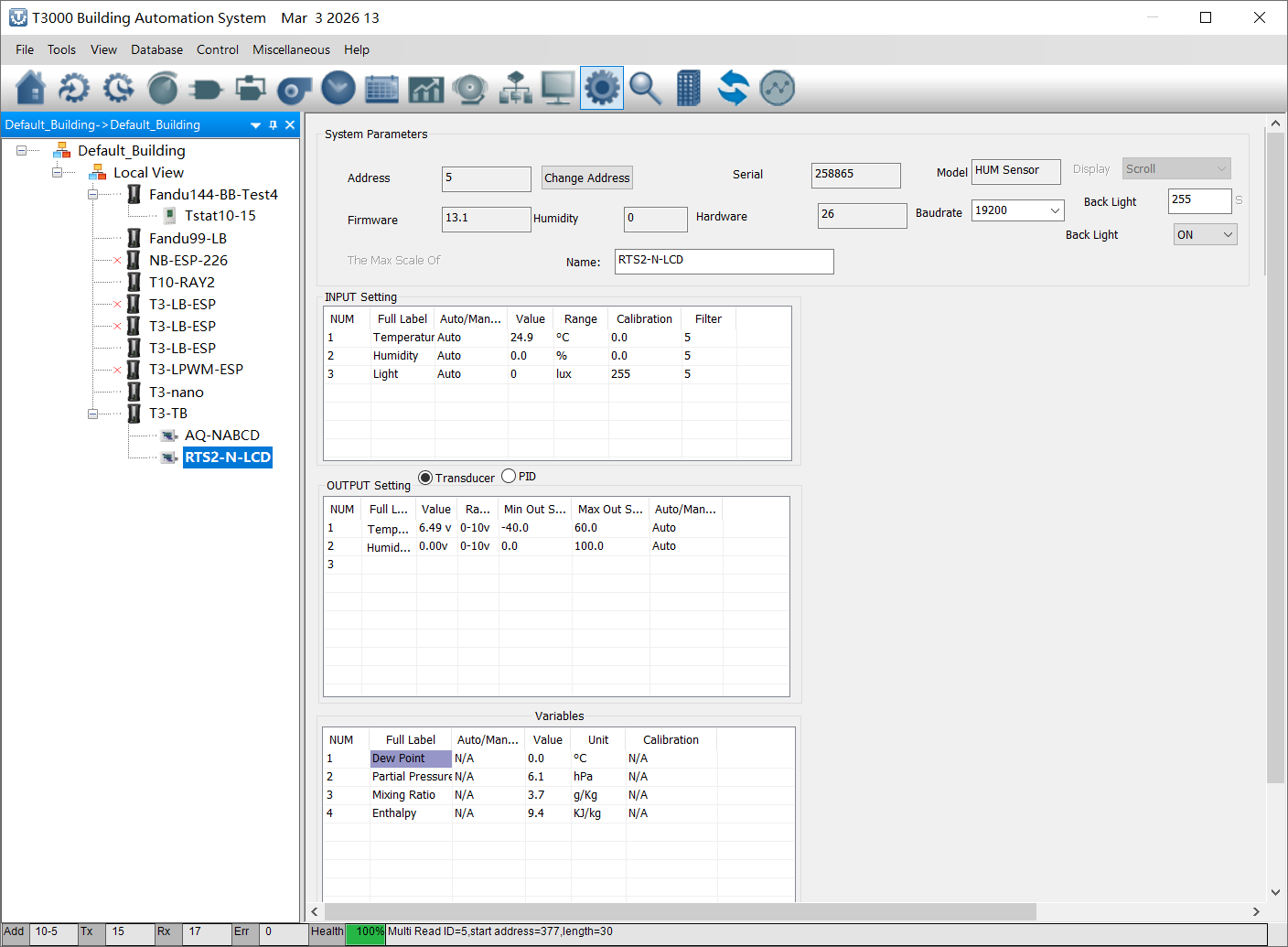
Since you also mentioned it is not stable even when connected directly to the PC, that points even more toward communication settings or wiring. If you can post the RTS2 settings, T3-LB serial settings, and wiring, we can help check it further.
Cody,
Make sure you are connecting to the TB with Ethernet and then use one of the 485 ports set to modbus to talk with the device. Previously I tried 485 bacnet with modbus devices and was told T3000 doesn’t support communications this way. Swapping to Ethernet made it a lot better. Also, do one device at a time so you are sure there is no a duplicate default address. Make sure you have terminator resistors installed across your network at least on one end for a test bench. In the field, both ends. Check the timing parameters, there is a delay in modbus meant to allow time for electrical ringing or noise to settle down before the next transmission. If you have some communications but not good and you are sure about good wiring connections, etc., then length this delay. Double it to see if you get good communications. Also, the T 3000 software tries to do a lot of stuff in the background so when you first try a new setup, you have to be patient. Wait at least 5 minutes after connecting to the TB to see if a slave device will populate under it. Then explore the TB settings network health button for info on errors and attempts. John
Just to clarify, T3000 can discover devices on the T3 RS485 ports. It is not limited to only one method.
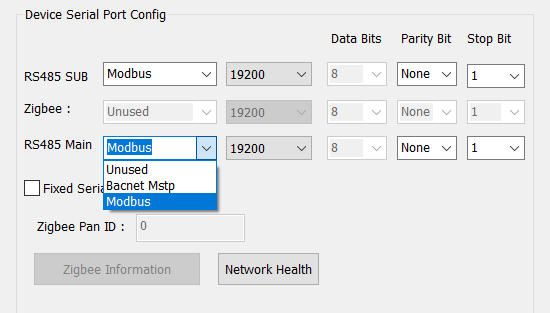
If you connect to the T3 over Ethernet, then open the T3 Settings > Communication page and set that RS485 port to match the device you are connecting, including the protocol (Modbus or BACnet) and baud rate, T3000 should be able to find the device automatically and show it under the T3 in the device list.
For now, I would test with just one RTS2-N-LCD on the port, make sure the address is unique, and keep the protocol and baud rate matched on both sides. Since you also mentioned it is not stable even when connected directly to your PC, that still points more to a communication setting or wiring issue than a T3000 limitation.
If you can post a screenshot of the RTS2 communication settings and the T3 communication page, we can take a closer look.
Thank you for the advice. I hadn’t used termination resistors since I only have about 6" of cable between the devices, but I’ll give that a try. I have one of them talking to a T3 controller on modbus now, no packet loss but lots of network timeouts.
Thanks for the input. I was able to get a T3-TB at my office to communicate with an RTS2. I still could not get the T3 to recognize the RTS through 485 by itself, I ended up connecting a usb/485 adaptor to both the controller and the RTS from my laptop, as well as connecting the laptop to the T3-TB with ethernet. Everything showed up on then network tree then, and I disconnected the laptop from the 485 network (not sure if RS485 likes hot swapping, but it worked?), and now everything is visible with just the ethernet connection, and I can read registers from the RTS2 now (have not tried switching to bacnet).
I’ll attach screenshots of my settings, but I think I have everything set so it should communicate? I’ve tried a few different RTS2’s and T3’s and have similar issues, so I think it’s likely a user issue.
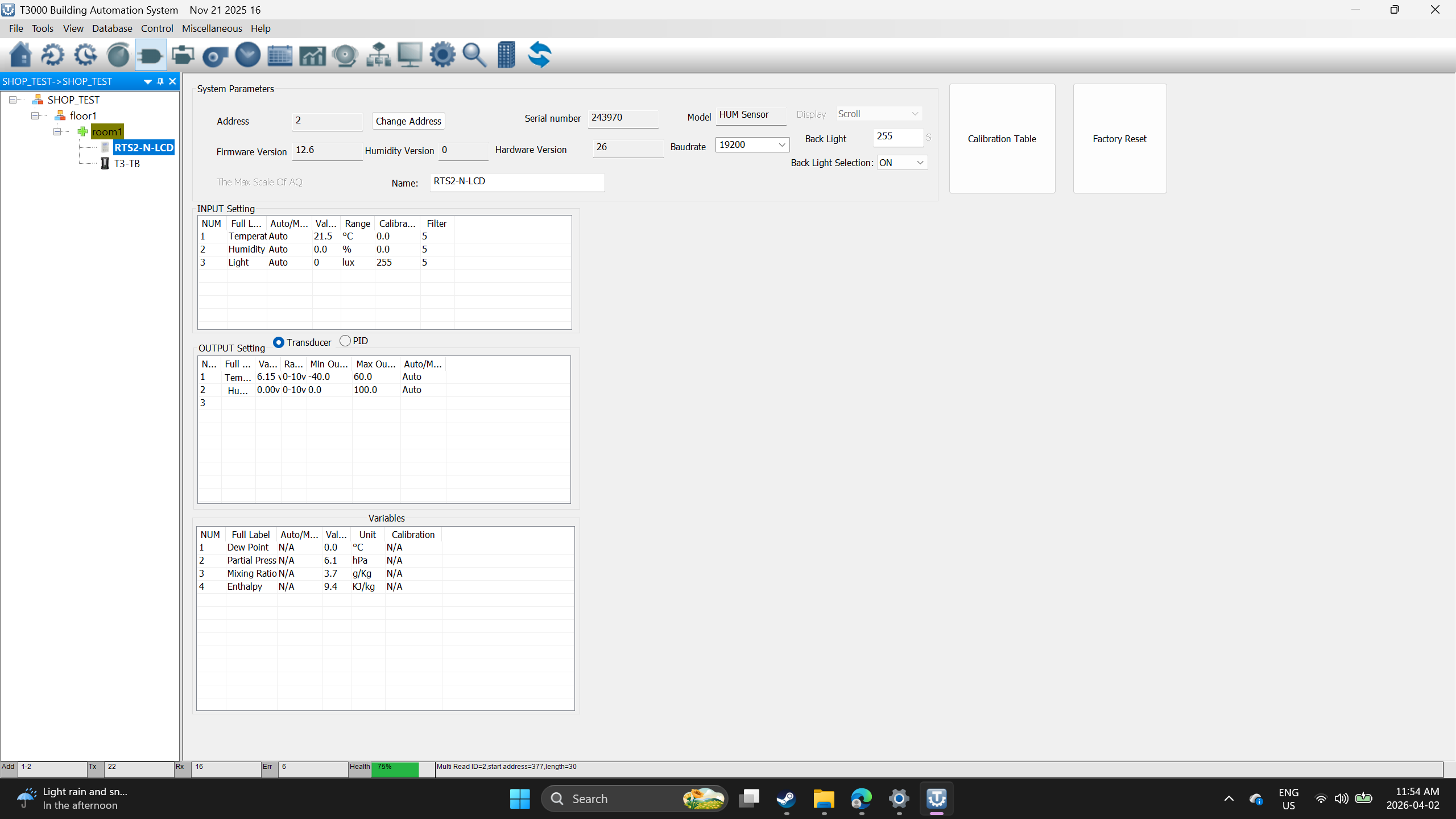
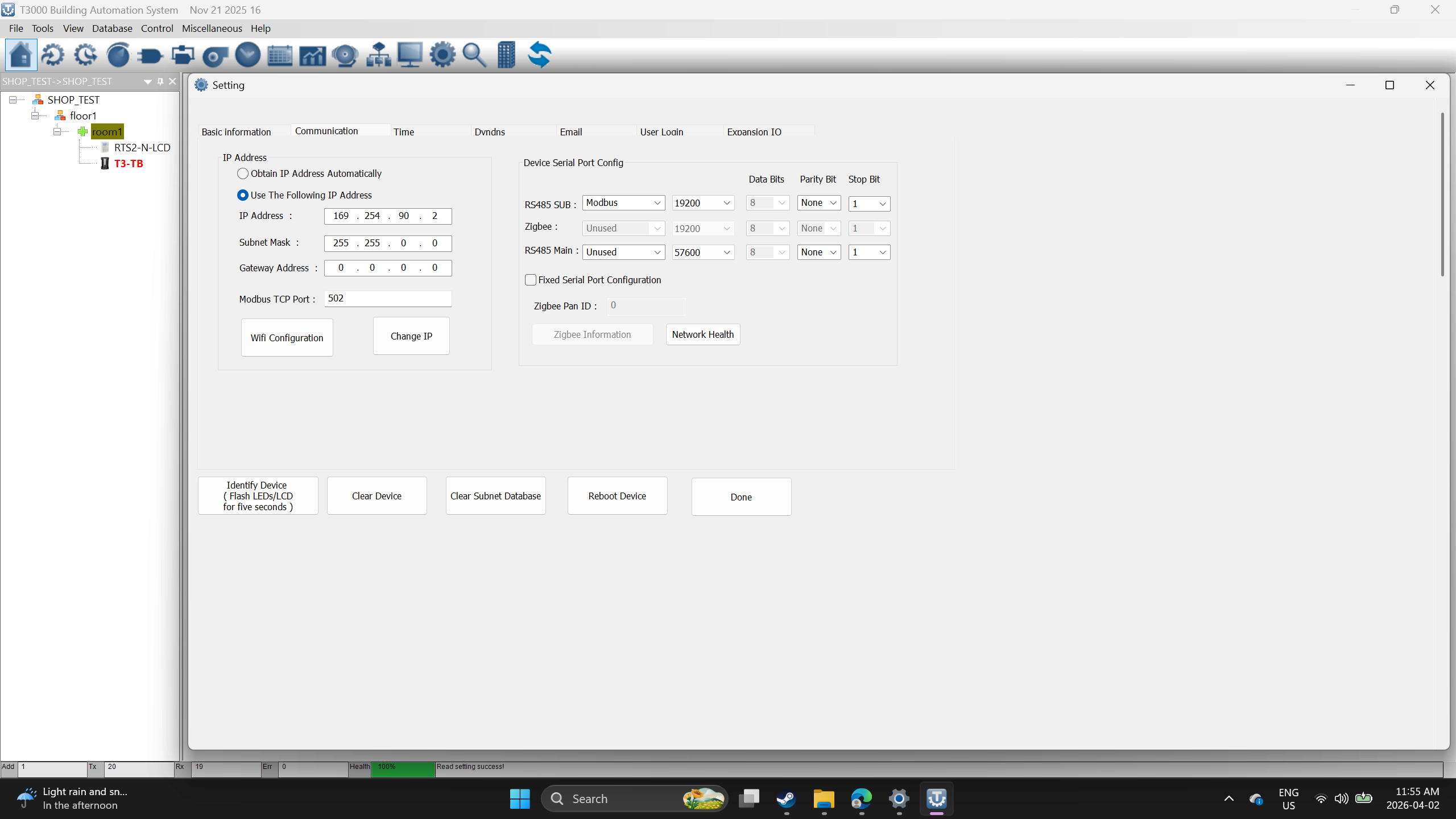
Also, is there a modbus register for the setpoint value of the RTS2? I could not find it. Or is it only accessible through BACNET?
Terminator resistors will probably not make a difference with 6 inches of wire but good habit to use them. Consider it a must when in the field.
No packets loss but timeouts may just be that you are polling or talking to the device without giving it time to do the other processes it needs to do. The slave device could just be busy and ignores the request.
I have several ( almost 100) units with a modbus device on the slave port. Some will work well for a while and then not work very well. They are at the default baud rate of 115k. I looked for the time delay variable I talked about but don’t see it in the TB setup. Other systems I use have that and it is a good place to just make sure the comm is not trying to go too fast. If TB doesn’t have that option, maybe try a slower baud rate. You may need to also put the modbus communication in a section of programming that gets skipped unless a counter is greater than 30. Reset the counter to 0 inside the loop when the modbus variables are written/read. Add 1 to the counter each pass before the loop. This gives you 30 seconds without modbus comm. My modbus status pressure sensor shows rx and tx accumulate. Timeout = about 3% of tx value. No packets errors. If I click on device I get reading abnormal, health at the bottom shows between 30 and 60 percent. Multiple tries and power cycles will usually let me talk with it.
I think you might have solved it for me, I tried the loop counter idea and timeouts stopped increasing. I was able to switch the devices to BACNET and everything is communicating now, I can read the temperature and setpoint of the RTS. Thanks a bunch for the help.
Ok great.
Keep my contact info in case you ever need to sub out any work.
John3302328@gmail.com
Glad to hear you got it working, and thanks for posting the fix.
This also pointed out something we can improve. We will add an alert for RS485 baud rate mismatch to help catch this kind of problem in the field, similar to the panel ID conflict alert.
Also, to answer your question about setpoint: right now there is no Modbus register for the RTS2 setpoint. If needed, we can add that in a future firmware update.
Lijun, for sure the should be in the Bacnet objects and modbus registers, add it asap.